Loading
Form preview
  • US Legal Forms
  • Other Templates
  • More Forms
  • More Multi-State Forms
  • San Jose State University Undergraduate Duplicate Diploma Request 2022

Get San Jose State University Undergraduate Duplicate Diploma Request 2022-2026

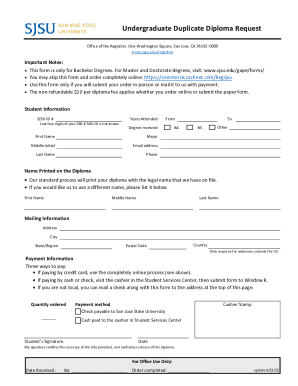
Undergraduate Duplicate Diploma Request Office of the Registrar, One Washington Square, San Jose, CA 951920009 www.sjsu.edu/registrarImportant Notes: This form is only for Bachelor Degrees. For Master.

How it works

  1. Open form

    Open form follow the instructions

  2. Easily sign form

    Easily sign the form with your finger

  3. Share form

    Send filled & signed form or save

How to fill out the San Jose State University Undergraduate Duplicate Diploma Request online

This guide provides clear and comprehensive instructions for completing the San Jose State University Undergraduate Duplicate Diploma Request. Whether you are ordering your diploma for the first time or replacing a lost one, following these steps will ensure a smooth process.

Follow the steps to complete your duplicate diploma request online.

  1. Click ‘Get Form’ button to access the duplicate diploma request form and open it in your editor.
  2. Provide your student information in the designated fields. This includes your SJSU ID number, the last four digits of your Social Security Number if your SJSU ID is unknown, and years attended (from and to). Specify the degree received, selecting either BA or BS, and enter your first name, middle initial, last name, major, email address, and phone number.
  3. In the 'Name Printed on the Diploma' section, input the legal name as it should appear on the diploma. If a different name is desired, list it in the provided spaces for first name, middle name, and last name.
  4. Complete the mailing information by entering your address, city, state/region, and postal code. If your address is outside the United States, include the country.
  5. Proceed to the payment information section. Here, you will note the quantity of diplomas you are ordering. Select your payment method: if paying by check or cash, follow the instructions provided and ensure the payment is processed correctly. If paying via credit card, consider the option to process the payment completely online.
  6. Sign and date the form. Your signature certifies the accuracy of the information provided and authorizes the release of the diploma.
  7. Once you have completed the form, you have the option to save your changes, download, print, or share the form as necessary depending on how you choose to submit it.

Start completing your duplicate diploma request form now to ensure timely processing.

Get form

Experience a faster way to fill out and sign forms on the web. Access the most extensive library of templates available.
Get form

Related content

Student Records & Transcripts
To obtain a transcript from a private or vocational college, you will need to contact the...
Learn more
Duplicate Diploma Request Form
This form is only for Bachelor Degrees. For Master and Doctorate degrees, visit:...
Learn more
Untitled
... 2022, Best led light colors for studying, Westfield state rn to bsn, Female ... san...
Learn more

Related links form

NE DoR 1040N-MIL 2018 NE DoR 1040N-MIL 2017 NE DoR 1040N-MIL 2014 NE DoR 20 2018

Questions & Answers

Get answers to your most pressing questions about US Legal Forms API.

Contact support

All declared students who want to change majors or add minors should do so before earning 90 units. If you are a Transfer student wanting to switch majors, please contact the major department for impaction information. All majors require IMPACTION CRITERIA (courses, GPA, grades, tests, etc).

Choosing Between a Minor and a Double Major Double majors can sometimes require students to stay in college longer, especially if declared later in their college career, experts say. A minor allows for a quicker path toward a credential in a discipline that can still be reflected on a resume.

Graduation is the process where a student completes all program requirements and the university awards the degree. Commencement is the ceremony to honor graduating students.

Most hiring managers don't look for specific minors (or even majors, in many cases) when evaluating job applicants. That said, employers do care a lot about breadth and depth of learning, ing to a 2021 survey from the American Association of Colleges and Universities.

A student's minor does not usually appear on their diploma. Instead, the diploma lists the major and the date the graduate earned their degree. That said, college transcripts do list minors.

Electronic transcripts should be sent to etranscript@sjsu.edu directly from your school(s). Official transcripts (in sealed envelopes) can be mailed to Graduate Admissions and Program Evaluations Office. Copies or opened transcripts are NOT accepted.

Most colleges will note a minor on the transcript, but not on the diploma, and I don't know of any institution which issues a separate diploma for a minor. Technically, diplomas are for completed degrees, and minors are generally not considered degreees, but rather are seen as concentrations of curriculum content.

If you opt to complete a minor, it likely won't show up on your diploma. Instead, it will typically be listed on your transcripts. As you begin applying for jobs, you can include both your major and minor on your resume, showing employers the extra work you put into your degree.

Get This Form Now!

Use professional pre-built templates to fill in and sign documents online faster. Get access to thousands of forms.
Get form
If you believe that this page should be taken down, please follow our DMCA take down processhere.
Get San Jose State University Undergraduate Duplicate Diploma Request
Get form
  • Adoption
  • Bankruptcy
  • Contractors
  • Divorce
  • Home Sales
  • Employment
  • Identity Theft
  • Incorporation
  • Landlord Tenant
  • Living Trust
  • Name Change
  • Personal Planning
  • Small Business
  • Wills & Estates
  • Packages A-Z
  • Affidavits
  • Bankruptcy
  • Bill of Sale
  • Corporate - LLC
  • Divorce
  • Employment
  • Identity Theft
  • Internet Technology
  • Landlord Tenant
  • Living Wills
  • Name Change
  • Power of Attorney
  • Real Estate
  • Small Estates
  • Wills
  • All Forms
  • Forms A-Z
  • Other Templates
  • Legal Hub
  • About Us
  • Help Portal
  • Legal Resources
  • Blog
  • Affiliates
  • Contact Us
  • Delete My Account
  • Site Map
  • Industries
  • Forms in Spanish
  • Localized Forms
  • State-specific Forms
  • Forms Kit
  • Real Estate Handbook
  • All Guides
  • Notarize
  • Incorporation services
  • For Consumers
  • For Small Business
  • For Attorneys
  • USLegal
  • FormsPass
  • pdfFiller
  • signNow
  • altaFlow
  • DocHub
  • Instapage
Form Packages
  • Adoption
  • Bankruptcy
  • Contractors
  • Divorce
  • Home Sales
  • Employment
  • Identity Theft
  • Incorporation
  • Landlord Tenant
  • Living Trust
  • Name Change
  • Personal Planning
  • Small Business
  • Wills & Estates
  • Packages A-Z
Form Categories
  • Affidavits
  • Bankruptcy
  • Bill of Sale
  • Corporate - LLC
  • Divorce
  • Employment
  • Identity Theft
  • Internet Technology
  • Landlord Tenant
  • Living Wills
  • Name Change
  • Power of Attorney
  • Real Estate
  • Small Estates
  • Wills
  • All Forms
  • Forms A-Z
  • Other Templates
Customer Service
  • Legal Hub
  • About Us
  • Help Portal
  • Legal Resources
  • Blog
  • Affiliates
  • Contact Us
  • Delete My Account
  • Site Map
  • Industries
  • Forms in Spanish
  • Localized Forms
  • State-specific Forms
  • Forms Kit
Legal Guides
  • Real Estate Handbook
  • All Guides
Prepared for you
  • Notarize
  • Incorporation services
Our Customers
  • For Consumers
  • For Small Business
  • For Attorneys
Our Sites
  • USLegal
  • FormsPass
  • pdfFiller
  • signNow
  • altaFlow
  • DocHub
  • Instapage
Social Media
Call us now toll free:
+1 833 426 79 33
As seen in:
© Copyright 1999-2026 airSlate Legal Forms, Inc. 17 Station Street, Ste. 203, Brookline, MA 02445
  • Your Privacy Choices
  • Terms of Service
  • Privacy Notice
  • Content Takedown Policy
  • Bug Bounty Program