Loading
Get Government Purchase Order
How it works
-

Open form follow the instructions
-

Easily sign the form with your finger
-

Send filled & signed form or save
How to fill out the Government Purchase Order online
Filling out a Government Purchase Order online can be straightforward with the right guidance. This guide provides clear, step-by-step instructions to ensure that you complete the form correctly and efficiently.
Follow the steps to accurately complete the form.
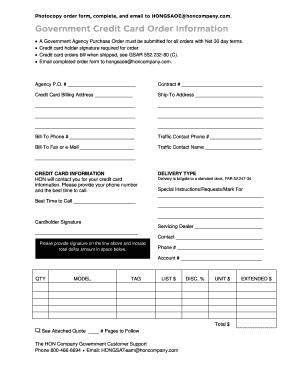
- Click ‘Get Form’ button to obtain the form and open it in the editor.
- Begin by entering the Agency Purchase Order number in the designated field. This number identifies your order within the government agency.
- Next, provide the Contract number. This number is essential as it ties your purchase to a specific agreement.
- Fill in the credit card billing address. Ensure that this address matches the one on file with the credit card issuer.
- Enter the Ship-To Address where you want the items delivered. Include any details that could assist in successful delivery.
- Input the Bill-To phone number and the Traffic Contact phone number. These contacts will assist in any inquiries related to shipping and billing.
- Indicate the Bill-To fax number or e-mail for electronic communication, if applicable.
- Provide the Traffic Contact Name, who will be responsible for coordinating delivery.
- In the Credit Card Information section, indicate that HON will contact you to obtain your credit card details. Specify your phone number and the best time to call.
- Select the Delivery Type, noting that delivery will be tailgate to a standard dock as per regulations.
- Include any Special Instructions or Requests in the provided space to inform the supplier of specific delivery or order preferences.
- Sign the form where indicated and include the total dollar amount for the order.
- Finally, complete your contact information, including your phone number and account number.
- Once you have filled out the form, review all sections for accuracy. You can save changes, download, print, or share the completed document.
Complete your Government Purchase Order online today for a streamlined purchasing process.
Legal ValuePurchase orders are commercial documents while contracts are legally bound documents. Purchase orders do not become legally binding documents until they are accepted by the seller whereas a contract is a legal document from the start.