Loading
Form preview
  • US Legal Forms
  • Form Library
  • More Forms
  • More Uncategorized Forms
  • State Form 43591 (r12 1009)

Get State Form 43591 (r12 1009)

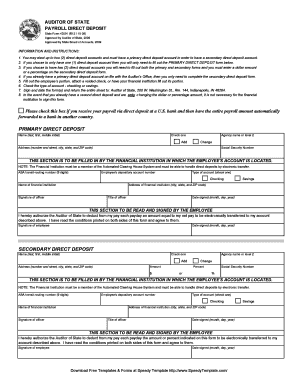
Reset Form AUDITOR OF STATE PAYROLL DIRECT DEPOSIT State Form 43591 (R12 / 10-09) Approved by Auditor of State, 2009 Approved by State Board of Accounts, 2009 INFORMATION AND INSTRUCTIONS: 1. You.

How it works

  1. Open form

    Open form follow the instructions

  2. Easily sign form

    Easily sign the form with your finger

  3. Share form

    Send filled & signed form or save

How to fill out the State Form 43591 (R12 1009) online

State Form 43591 is used for Payroll Direct Deposit and allows users to establish one or two direct deposit accounts. This guide provides clear, step-by-step instructions on how to fill out this form online, ensuring a smooth process for all users.

Follow the steps to complete your direct deposit form online.

  1. Use the ‘Get Form’ button to obtain the form and open it for editing.
  2. Complete the 'Primary Direct Deposit' section by entering your name, agency name, address, and Social Security number. Choose whether you are adding or changing your account.
  3. Fill in the financial institution's details, including the ABA transit-routing number, your depository account number, and type of account (checking or savings).
  4. Sign and date the 'Primary Direct Deposit' section, indicating your authorization for the Auditor of State to handle your direct deposit.
  5. If you wish to establish a 'Secondary Direct Deposit', complete that section with your name, chosen amount or percentage, and Social Security number.
  6. Again, provide the financial institution's information for the secondary account and ensure that an officer signs it.
  7. Sign and date the 'Secondary Direct Deposit' section, confirming your understanding and agreement to the terms.
  8. Once all sections are completed, save your changes, and prepare to print or share the form as necessary.

Complete your State Form 43591 online today to ensure timely direct deposit for your payroll.

Get form

Experience a faster way to fill out and sign forms on the web. Access the most extensive library of templates available.
Get form

Related content

Natural Gas Annual - EIA
Form EIA-857, “Monthly Report of Natural Gas Purchases and Deliveries to ... R12.9...
Learn more
master - UNT Digital Library
The views and opinions of authors expressed herein do not necessarily state or ... Source:...
Learn more

Related links form

Sample Format Letter Of Medical Necessity - JanssenAccessOnecom Ekurhuleni Municipality Proof Of Residence Pdf Detailed Lesson Plan In Tle Hobby Lobby Math Test 2022

Questions & Answers

Get answers to your most pressing questions about US Legal Forms API.

Contact support

Replace with altered or summary information. Keep linkages intact by applying pseudonyms, aggregate nouns, and categories consistently. Clearly indicate altered sections. Document the list of de-identification rules, both for yourself, or for your team should you collaborate.

Call transcription is the conversion of a voice or video call audio track into written words to be stored as plain text in a conversational language.

A redaction is applied when confidential information that appears within transcript text needs to be removed. The redaction tool allows you to select and highlight text within the transcript that contains sensitive information. The redaction appears transparent until printed.

The whole audio redaction process can easily be done in simple steps: Uploading an Audio File. Selecting the audio segment you want to redact. Choosing a redaction method from options (Mute & Bleep) Exporting the redacted audio file.

A redaction rule tells MarkLogic how to locate the content within a document that will be redacted and how to modify that portion. A rule expresses the business logic, independent of the documents to be redacted. A key component of a redaction rule is a redaction function specification.

Yes, call transcription is legal in most countries as long as all parties involved in the conversation consent to it. In some cases, such as market research or interviews, transcription services may also be used without the consent of all parties involved.

1 Answer. If you're simply omitting minor or confidential details from the transcript, you can use a ellipsis dots “...” which are widely understood for this purpose: Ellipsis • the omission from speech or writing of a word or words that are superfluous or able to be understood from contextual clues.

Get This Form Now!

Use professional pre-built templates to fill in and sign documents online faster. Get access to thousands of forms.
Get form
If you believe that this page should be taken down, please follow our DMCA take down processhere.

Industry-leading security and compliance

US Legal Forms protects your data by complying with industry-specific security standards.
  • In businnes since 1997
    25+ years providing professional legal documents.
  • Accredited business
    Guarantees that a business meets BBB accreditation standards in the US and Canada.
  • Secured by Braintree
    Validated Level 1 PCI DSS compliant payment gateway that accepts most major credit and debit card brands from across the globe.
Get State Form 43591 (R12 1009)
Get form
  • Adoption
  • Bankruptcy
  • Contractors
  • Divorce
  • Home Sales
  • Employment
  • Identity Theft
  • Incorporation
  • Landlord Tenant
  • Living Trust
  • Name Change
  • Personal Planning
  • Small Business
  • Wills & Estates
  • Packages A-Z
  • Affidavits
  • Bankruptcy
  • Bill of Sale
  • Corporate - LLC
  • Divorce
  • Employment
  • Identity Theft
  • Internet Technology
  • Landlord Tenant
  • Living Wills
  • Name Change
  • Power of Attorney
  • Real Estate
  • Small Estates
  • Wills
  • All Forms
  • Forms A-Z
  • Form Library
  • Legal Hub
  • About Us
  • Help Portal
  • Legal Resources
  • Blog
  • Affiliates
  • Contact Us
  • Delete My Account
  • Site Map
  • Industries
  • Forms in Spanish
  • Localized Forms
  • State-specific Forms
  • Forms Kit
  • Real Estate Handbook
  • All Guides
  • Notarize
  • Incorporation services
  • For Consumers
  • For Small Business
  • For Attorneys
  • USLegal
  • FormsPass
  • pdfFiller
  • signNow
  • altaFlow
  • DocHub
  • Instapage
Form Packages
  • Adoption
  • Bankruptcy
  • Contractors
  • Divorce
  • Home Sales
  • Employment
  • Identity Theft
  • Incorporation
  • Landlord Tenant
  • Living Trust
  • Name Change
  • Personal Planning
  • Small Business
  • Wills & Estates
  • Packages A-Z
Form Categories
  • Affidavits
  • Bankruptcy
  • Bill of Sale
  • Corporate - LLC
  • Divorce
  • Employment
  • Identity Theft
  • Internet Technology
  • Landlord Tenant
  • Living Wills
  • Name Change
  • Power of Attorney
  • Real Estate
  • Small Estates
  • Wills
  • All Forms
  • Forms A-Z
  • Form Library
Customer Service
  • Legal Hub
  • About Us
  • Help Portal
  • Legal Resources
  • Blog
  • Affiliates
  • Contact Us
  • Delete My Account
  • Site Map
  • Industries
  • Forms in Spanish
  • Localized Forms
  • State-specific Forms
  • Forms Kit
Legal Guides
  • Real Estate Handbook
  • All Guides
Prepared for you
  • Notarize
  • Incorporation services
Our Customers
  • For Consumers
  • For Small Business
  • For Attorneys
Our Sites
  • USLegal
  • FormsPass
  • pdfFiller
  • signNow
  • altaFlow
  • DocHub
  • Instapage
Social Media
Call us now toll free:
+1 833 426 79 33
As seen in:
© Copyright 1999-2026 airSlate Legal Forms, Inc. 3720 Flowood Dr, Flowood, Mississippi 39232
  • Your Privacy Choices
  • Terms of Service
  • Privacy Notice
  • Content Takedown Policy
  • Bug Bounty Program