Loading
Get Preopchecklist6.8.12.doc - Memorialcare
How it works
-

Open form follow the instructions
-

Easily sign the form with your finger
-

Send filled & signed form or save
How to use or fill out the PREOPChecklist6.8.12.doc - Memorialcare online
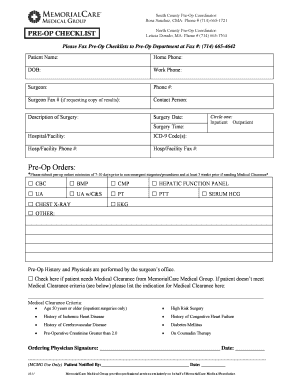
Filling out the PREOPChecklist6.8.12.doc is an essential step in preparing for surgery. This guide aims to provide clear instructions to assist users in completing the form accurately and efficiently.
Follow the steps to complete your pre-operative checklist.
- Press the ‘Get Form’ button to access the document. This will allow you to open the form in your preferred editor.
- Begin by entering the patient’s name in the designated field. Ensure that it matches the identification documents for accuracy.
- Fill in the home phone and work phone numbers so that the medical team can reach the patient for any necessary follow-up.
- Input the date of birth (DOB) of the patient. Be careful to enter the date in the correct format.
- Provide the name of the surgeon along with their phone number for any surgical inquiries.
- Include the surgeon's fax number if you wish to receive a copy of surgical results or other pertinent information.
- Identify the contact person, who can be reached for additional questions or clarifications regarding the surgery.
- Describe the type of surgery in the corresponding field to give clarity on the procedure planned.
- Enter the scheduled surgery date and time to facilitate proper planning and coordination.
- Specify the hospital or facility where the surgery will be performed.
- Input the ICD-9 code(s) related to the patient's condition or surgery, if applicable.
- Provide the contact phone number and fax number for the hospital or facility listed.
- Indicate whether the patient will be an inpatient or outpatient by circling the appropriate option.
- In the Pre-Op Orders section, mark the relevant tests that are required for the surgery, ensuring to submit them at least 7-10 days prior to non-emergency procedures.
- If the patient requires medical clearance, check the appropriate box and specify the reasons for clearance if necessary.
- Ensure the ordering physician signs and dates the form to validate the pre-operative orders.
- Finally, review all entered information for accuracy before saving changes, downloading, printing, or sharing the completed form.
Complete your pre-operative checklist online today for a smooth surgical process.
Use a platform that encrypts data Find a secure SMS platform with encryption to protect users' data. This ensures unauthorized parties can't read the messages on the SMS platform.