Loading
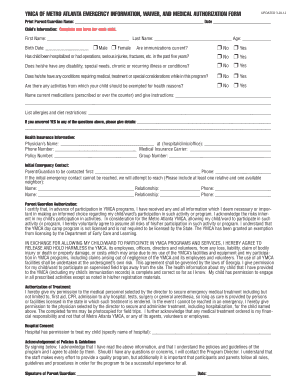
Get Ymca Of Metro Atlanta Emergency Information ... - Ymcaatlanta
How it works
-

Open form follow the instructions
-

Easily sign the form with your finger
-

Send filled & signed form or save
How to fill out the YMCA of Metro Atlanta emergency information form online
Filling out the YMCA of Metro Atlanta emergency information form is a crucial step in ensuring the safety and health of your child while participating in YMCA programs. This guide offers clear instructions on how to accurately complete the form to meet the needs of your child.
Follow the steps to successfully complete the form.
- Press the ‘Get Form’ button to access the emergency information form and display it in your preferred editor.
- Provide the print name of the parent or guardian at the top of the form, along with the date.
- Fill out the child's information section. Make sure to enter the child's first name, last name, age, and birth date. Additionally, indicate the child's gender.
- Answer the question about whether the child's immunizations are current. This is vital for the child's safety in program activities.
- Respond to inquiries regarding the child's medical history, including any hospitalizations, serious injuries, disabilities, special needs, chronic conditions, or dietary restrictions.
- If applicable, detail any current medications, including prescribed drugs and over-the-counter options, along with specific instructions for their administration.
- List any allergies and dietary restrictions the child has to ensure a safe environment.
- If you answered 'yes' to any health-related questions, please provide detailed explanations in the provided sections.
- Complete the health insurance information, including the physician's name, contact information, medical insurance carrier, policy number, and group number.
- Fill in initial emergency contact information, including the primary parent or guardian’s name and phone number, and at least one alternative contact.
- Read and sign the parent/guardian authorization and treatment consent sections. This indicates understanding of the risks associated with participation in YMCA programs.
- Acknowledge the policies and guidelines by signing and dating the form at the bottom.
- Once completed, fax the signed waiver and authorization along with the emergency form to the appropriate YMCA location listed at the bottom of the document.
Complete your YMCA emergency information form online today to ensure your child's safe participation in programs.
You can cancel any time by providing a 30-day written notice to your YMCA home branch.
Industry-leading security and compliance
US Legal Forms protects your data by complying with industry-specific security standards.
-
In businnes since 199725+ years providing professional legal documents.
-
Accredited businessGuarantees that a business meets BBB accreditation standards in the US and Canada.
-
Secured by BraintreeValidated Level 1 PCI DSS compliant payment gateway that accepts most major credit and debit card brands from across the globe.