Loading
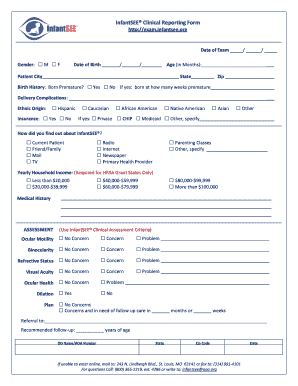
Get Infantsee Exam Form Pdf
How it works
-

Open form follow the instructions
-

Easily sign the form with your finger
-

Send filled & signed form or save
How to fill out the InfantSEE Exam Form Pdf online
Filling out the InfantSEE Exam Form Pdf online is an essential step in ensuring your child's vision health. This guide provides clear, step-by-step instructions to help you successfully complete the form with ease.
Follow the steps to fill out the InfantSEE Exam Form Pdf online:
- Click the ‘Get Form’ button to access the InfantSEE Exam Form Pdf and open it for editing.
- Begin by entering the date of your child’s exam in the designated fields. Ensure that you format the date as MM/DD/YYYY.
- Select the appropriate option for gender by marking the box for either Male (M) or Female (F) as applicable.
- Fill in your child's date of birth by entering it in the required sections.
- Indicate the age of your child in months by writing the numerical age in the provided space.
- Complete the patient’s city and state information along with the zip code.
- Under the Birth History section, specify if your child was born premature by choosing ‘Yes’ or ‘No’. If yes, indicate the number of weeks premature.
- List any delivery complications that may have occurred during childbirth.
- Identify your child’s ethnicity by selecting from the provided options.
- Enter the type of insurance covered, if applicable, and select the appropriate category.
- Specify how you learned about InfantSEE® by checking the relevant box for current patient, referral, or another option.
- If applicable, fill out the yearly household income section as required for HRSA Grant states.
- Provide the medical history information needed, including ocular motility, binocularity, refractive status, visual acuity, and ocular health.
- Make the necessary assessments by selecting the appropriate concerns and indicating if a follow-up is needed.
- Finally, enter the name and details of the referring professional, if relevant, and date the form.
- Once all sections are filled out, save your changes, download, print, or share the completed form as needed.
Complete your documents online to ensure easy submission and record-keeping.
So what do the extra numbers mean? These last 4 digits represent specific delivery routes within delivery areas. This extra detail means an even more precise matching to a more granular level. It could represent a handful of houses on one side of a street, or even a single building that receives a high volume of mail.