Loading
Get Ie Hr 102 2020-2026
How it works
-

Open form follow the instructions
-

Easily sign the form with your finger
-

Send filled & signed form or save
How to fill out the IE HR 102 online
The IE HR 102 form is essential for documenting changes to an employee's contractual terms and conditions. This guide provides clear, step-by-step instructions to help users fill out the form accurately and efficiently, regardless of their prior experience with digital document management.
Follow the steps to complete the IE HR 102 online effectively.
- Click the ‘Get Form’ button to obtain the form and open it in the editor.
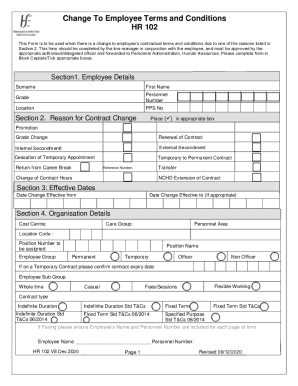
- Enter the employee's details in Section 1. Include the surname, first name, grade, personnel number, location, and PPS number, ensuring accuracy and clarity.
- In Section 2, identify the reason for the contract change by placing a check mark in the appropriate box. Options include promotion, grade change, and transfer, among others.
- Proceed to Section 3, where you will need to input the effective dates for the change. Specify the 'from' and 'to' dates as required.
- For Section 4, provide the organisational details, such as cost centre, care group, personnel area, location code, and position number. Ensure that you confirm if the employee is on a temporary contract.
- In Section 5, fill out the working week details. Indicate the weekly contracted hours and select the appropriate work schedule rule options.
- Complete Section 6 by providing pay details, including work location, annual salary, and payroll area.
- Section 7 requires you to list any allowances impacted by the contract change. Attach any necessary supporting documentation.
- In Section 8, the employee must declare the accuracy of the information by signing, dating, and providing their name, grade, email address, and mobile number.
- Section 9 requires the line manager's declaration, which includes their name, signature, date, and contact information.
- Lastly, Section 10 is for the delegated officer's approval. Include the name, signature, contact phone number, and date.
- Once all sections are complete, review the form for accuracy, then save changes, download, print, or share the completed document as needed.
Start completing your IE HR 102 form online today to ensure accurate record-keeping.
Human resources forms are documents used by a company's HR department to recruit and manage employees.