Loading
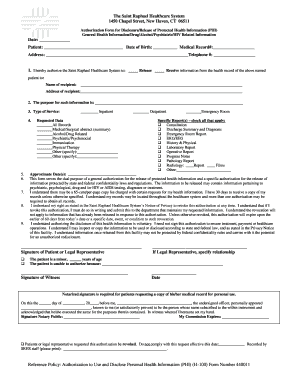
Get Hospital Of St. Raphael Release Of Information Form - Ct
How it works
-

Open form follow the instructions
-

Easily sign the form with your finger
-

Send filled & signed form or save
How to fill out the Hospital Of St. Raphael Release Of Information Form - Ct online
Filling out the Hospital Of St. Raphael Release Of Information Form online is an important step in managing your health information. This guide will provide you with clear and detailed instructions on how to complete each section of the form effectively.
Follow the steps to fill out the form correctly.
- Click the ‘Get Form’ button to obtain the Hospital Of St. Raphael Release Of Information Form and open it in your editor.
- Begin by entering the patient's name and date of birth in the spaces provided at the top of the form. Make sure to enter the medical record number and the patient's address and telephone number accurately.
- In section 1, indicate whether you authorize the release or receipt of information by selecting the appropriate box.
- Provide the name and address of the recipient to whom the information will be sent. This might be another healthcare provider or an individual.
- In section 2, state the purpose for which the information is being requested. Be clear and concise in your explanation.
- For section 3, choose the type of service pertaining to your request by selecting the appropriate option: inpatient or outpatient.
- Next, move to the ‘Requested Data’ section and check all relevant types of records you would like to request.
- In the ‘Specific Report(s)’ section, check all reports that apply to your request for precise information.
- Fill in any necessary approximate dates for the requested records in the designated area.
- Before finalizing, ensure that you have read and understand the authorization statement at the bottom of the form. Your signature or that of a legal representative is necessary.
- If a witness is required, ensure that a witness signs the form in the indicated space.
- Once all fields are filled out, review the form for accuracy. You can then save changes, download, print, or share the completed form as needed.
Complete your forms online easily and efficiently today!
Related links form
Alternatively, employees may call 844-543-2147 (844-543-21HR) 7:30 am - 5 pm Monday - Friday to speak to an HRConnect associate.
Industry-leading security and compliance
US Legal Forms protects your data by complying with industry-specific security standards.
-
In businnes since 199725+ years providing professional legal documents.
-
Accredited businessGuarantees that a business meets BBB accreditation standards in the US and Canada.
-
Secured by BraintreeValidated Level 1 PCI DSS compliant payment gateway that accepts most major credit and debit card brands from across the globe.