Loading
Get Request For An Unlisted Drug Product - Forms
How it works
-

Open form follow the instructions
-

Easily sign the form with your finger
-

Send filled & signed form or save
How to fill out the Request For An Unlisted Drug Product - Forms online
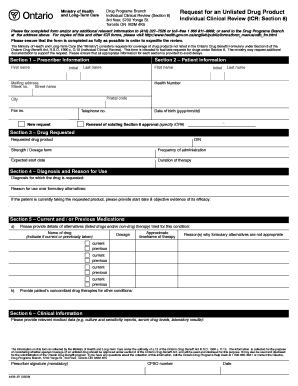
This guide provides comprehensive instructions for users on how to complete the Request For An Unlisted Drug Product form online. By following these steps, you can ensure that your request is filled out accurately and submitted promptly for review.
Follow the steps to successfully complete the form online.
- Click ‘Get Form’ button to obtain the form and open it in your preferred editing tool.
- Begin with Section 1, which requires the prescriber information. Fill in the prescriber’s first name, last name, initial, CPSO number, fax number, telephone number, and signature. Be sure to include the date of the signature.
- Proceed to Section 2, where you will input patient information. This includes the patient's first name, last name, initial, health number, mailing address (street number, street name, city, postal code), date of birth in the format yyyy/mm/dd, and telephone number.
- In Section 3, specify the drug requested. Enter the requested drug product name, drug identification number (DIN), strength or dosage form, frequency of administration, expected start date, and duration of therapy.
- Next, move to Section 4, where you need to describe the diagnosis for which the drug is requested. Provide the reason for using the requested drug over alternatives listed in the formulary. If applicable, include evidence of its efficacy and the date the requested product was started.
- In Section 5, detail current and/or previous medications. This includes listing alternatives that have been tried, indicating whether each drug is current or previously taken, along with their dosages, approximate timeframe of therapy, and reasons why formulary alternatives are not suitable. Also, provide information on any concomitant drug therapies for other conditions.
- Complete Section 6 by providing relevant clinical information, such as culture and sensitivity reports, serum drug levels, and laboratory results that support the request.
- Finally, review all sections for completeness and accuracy. Once verified, you can save the changes, download, print, or share the completed form as required.
Take action by completing the Request For An Unlisted Drug Product - Forms online to facilitate your request.
For faster decisions, prescribers can use the SADIE online portal to submit requests to the Exceptional Access Program (EAP). Sign in through GO Secure (https://.ebse.health.gov.on.ca) and select SADIE from the services drop-down menu. Visit the SADIE website for more information: http://.ontario.ca/sadie.
Industry-leading security and compliance
US Legal Forms protects your data by complying with industry-specific security standards.
-
In businnes since 199725+ years providing professional legal documents.
-
Accredited businessGuarantees that a business meets BBB accreditation standards in the US and Canada.
-
Secured by BraintreeValidated Level 1 PCI DSS compliant payment gateway that accepts most major credit and debit card brands from across the globe.