Loading
Get To Receive Your Refund
This website is not affiliated with IRS
How it works
-

Open form follow the instructions
-

Easily sign the form with your finger
-

Send filled & signed form or save
How to fill out the To Receive Your Refund online
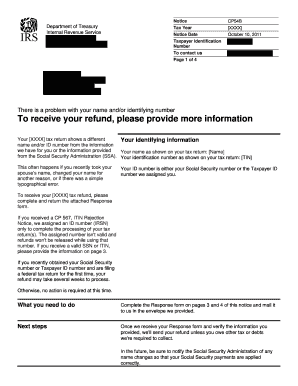
This guide provides a comprehensive overview of how to complete the To Receive Your Refund form online, ensuring you provide the necessary information for your tax refund. By following these detailed steps, you can resolve any discrepancies and facilitate a smooth refund process.
Follow the steps to successfully complete your refund form.
- Press the ‘Get Form’ button to obtain the document and open it in the designated editor.
- Review your identifying information displayed in the notice. Ensure that it matches your most recent Social Security card or Taxpayer ID card.
- In the provided fields, enter your first name, middle name, last name, and identification number exactly as shown on your Social Security or Taxpayer ID card.
- Check the statement that best describes your situation regarding the discrepancies in your identifying information. Select the appropriate statement and complete the form accordingly.
- If discrepancies exist, provide an explanation for these differences in the designated section, and attach copies of any legal documents that support your claims (e.g., marriage certificate, court records).
- If you have changed your address, ensure to fill in your new street address, city, state, and zip code in the contact information section.
- Place your signature in the provided area to confirm that the information submitted is correct and acknowledge its use for your tax return.
- Finally, submit your Response form along with any supporting documents as soon as possible. Ensure that if you are using your own envelope, you mail it to the address specified on the form.
Complete your document and submit it online to expedite your tax refund process.
Get form
Experience a faster way to fill out and sign forms on the web. Access the most extensive library of templates available.
Why is there no record of my return at Where's My Refund (WMR)? ... We cannot provide any information about your refund. You must wait at least 24 hours after you get the acknowledgment e-mail that your tax return was received by the IRS. Your e-filed return was accepted (received) by the IRS less than 24 hours ago.
Get This Form Now!
Use professional pre-built templates to fill in and sign documents online faster. Get access to thousands of forms.