Loading
Get Teslamotors Inclassnow
How it works
-

Open form follow the instructions
-

Easily sign the form with your finger
-

Send filled & signed form or save
How to fill out the Teslamotors Inclassnow online
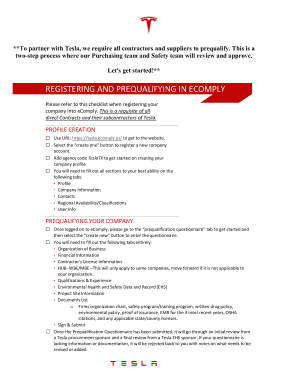
This guide provides a comprehensive overview of how to fill out the Teslamotors Inclassnow form online. By following these steps, users can ensure they properly complete the necessary information to partner with Tesla.
Follow the steps to successfully fill out the Teslamotors Inclassnow form.
- Click ‘Get Form’ button to access the Teslamotors Inclassnow form and open it in the designated editor.
- Begin by registering your company through eComply. Use the URL provided to navigate to the eComply platform. Select the ‘create one’ button to start the registration process.
- Enter the agency code TeslaTX to initiate the creation of your company profile. Make sure to complete all required sections on the following tabs: Profile, Company Information, Contacts, Regional Availability/Classifications, and User Info.
- Once registered, log on to eComply and proceed to the ‘prequalification questionnaire’ tab. Click on the ‘create new’ button to begin filling out the questionnaire.
- Thoroughly complete all tabs in the prequalification questionnaire, which include Organization of Business, Financial Information, Contractor’s License Information, HUB-WBE/MBE (if applicable), Qualifications & Experience, Environmental Health and Safety Data and Record (EHS), Project Site Information, and Documents List.
- Ensure to upload all necessary documents such as the firm’s organization chart, safety program/training program, written drug policy, environmental policy, proof of insurance, EMR for the last three years, OSHA citations, and any applicable state or county licenses.
- After filling out the questionnaire, select the ‘Sign & Submit’ option to submit your prequalification questionnaire for review.
- Await the results of the initial review by a Tesla procurement sponsor and a final review by a Tesla EHS sponsor. If your submission is incomplete, it will be returned to you with specific notes on missing information.
- Once you receive an approval for your prequalification questionnaire, you will have successfully qualified as a Tesla Contractor. Check your approval status on the vendor dashboard or in the prequalification questionnaire section.
- If awarded work, ensure you are also set-up in the Warp Supplier Portal, as this is required for all contractors and suppliers.
- For access to the site, ensure all prior steps are completed, including Tesla’s safety orientation and COVID-19 questionnaire.
- Review all information before saving changes, downloading, printing, or sharing your completed form.
Start filling out your documents online to complete your prequalification process with Tesla today.