Loading
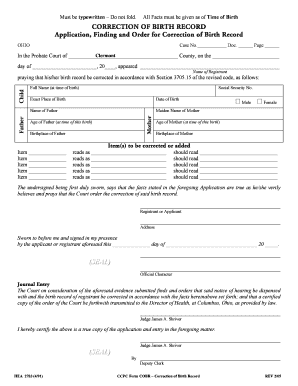
Get Hea.2783 Correction Of Birth Record - Probate / Juvenile Court ... - Probatejuvenile
How it works
-

Open form follow the instructions
-

Easily sign the form with your finger
-

Send filled & signed form or save
How to fill out the HEA.2783 Correction Of Birth Record - Probate / Juvenile Court online
Completing the HEA.2783 Correction of Birth Record can seem daunting, but this guide will help you navigate the process clearly and efficiently. By following these instructions, you can ensure that your application is filled out correctly to facilitate the necessary adjustments.
Follow the steps to accurately complete your HEA.2783 form.
- Press the 'Get Form' button to access the HEA.2783 Correction of Birth Record form online. This will allow you to open the document in an editable format.
- Begin by entering the case number, document number, and page number at the top of the form. Ensure all entries are accurate for proper identification.
- In the section labeled 'In the Probate Court of,' fill in the county where the application is being submitted along with the date of the application.
- Complete the name of the registrant (person whose birth record is being corrected) and their full name at the time of birth.
- Input the social security number, exact place of birth, and date of birth of the registrant to provide essential identification information.
- In the section for parental information, list the names of the father and mother, ensuring you capture the mother’s maiden name.
- Provide the ages of both the mother and father at the time of the registrant's birth, along with their respective birthplaces.
- Detail the specific items that require correction or addition in the respective sections. Clearly indicate what the current record states and what it should be corrected to read.
- Once all changes are noted, provide your signature under 'Registrant or Applicant' and include your address.
- Ensure the form is verified in the presence of an official who will provide a seal and their official character, indicating notarization.
- Submit the completed form online as indicated, where you may have options to save changes, download, print, or share the application.
Make sure to complete your documents online for a streamlined process.
Related links form
Correcting a Father's name or adding a Father: A father's name cannot be added or deleted from a Birth Certificate through the Probate Court. To add a father or delete a father from a Birth Certificate when the parents are not married, you must contact the Child Support Enforcement Agency.
Industry-leading security and compliance
US Legal Forms protects your data by complying with industry-specific security standards.
-
In businnes since 199725+ years providing professional legal documents.
-
Accredited businessGuarantees that a business meets BBB accreditation standards in the US and Canada.
-
Secured by BraintreeValidated Level 1 PCI DSS compliant payment gateway that accepts most major credit and debit card brands from across the globe.