Loading
Get Child Care Payment
How it works
-

Open form follow the instructions
-

Easily sign the form with your finger
-

Send filled & signed form or save
How to fill out the Child Care Payment online
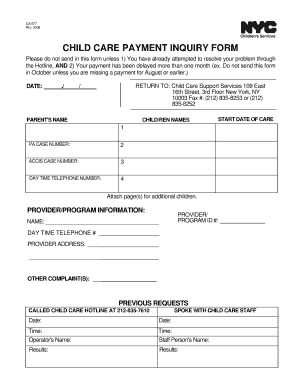
Filling out the Child Care Payment Inquiry Form online can streamline the process of addressing delayed payments for child care services. This guide will walk you through each section of the form with clear and supportive instructions to ensure you complete it accurately.
Follow the steps to complete the Child Care Payment form online.
- Click the ‘Get Form’ button to access the Child Care Payment Inquiry Form and open it in your editing software.
- Fill in the date at the top of the form. Make sure to enter today's date.
- Provide the parent’s name in the designated field, ensuring it is clear and spelled correctly.
- List the names of your child or children in the respective space provided.
- Indicate the start date of child care services in the appropriate section.
- Enter your PA case number in the designated field.
- Fill in your ACCIS case number, if applicable, in the following field.
- Provide a daytime telephone number where you can be reached.
- If you have additional children to include, attach a separate page with their information.
- In the Provider/Program Information section, enter the provider/program ID number.
- Fill in the name of the child care provider or program.
- Provide the daytime telephone number of the provider.
- Include the provider’s address in the section provided.
- If there are any other complaints, detail them in the specified area.
- Document previous requests by indicating if you have called the child care hotline or spoken with staff, including dates and results.
- Once all fields are completed, review the form for accuracy, then save your changes, download, print, or share the completed form as needed.
Take action now by filling out the Child Care Payment Inquiry Form online to resolve your payment issues promptly.
Register with MyGov. If you don't have one, you will need to create a myGov account. Complete an online CCS assessment. ( You will need to link your Centrelink account to myGov if you haven't done so) Provide the information required.
Industry-leading security and compliance
US Legal Forms protects your data by complying with industry-specific security standards.
-
In businnes since 199725+ years providing professional legal documents.
-
Accredited businessGuarantees that a business meets BBB accreditation standards in the US and Canada.
-
Secured by BraintreeValidated Level 1 PCI DSS compliant payment gateway that accepts most major credit and debit card brands from across the globe.