Loading
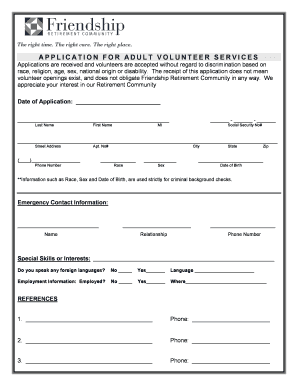
Get Friendship Applications
How it works
-

Open form follow the instructions
-

Easily sign the form with your finger
-

Send filled & signed form or save
How to fill out the Friendship Applications online
Filling out the Friendship Applications online can be a straightforward process when approached step by step. This guide is intended to help users navigate each section of the application clearly and effectively.
Follow the steps to complete your Friendship Applications easily.
- Press the ‘Get Form’ button to access the application form, ensuring it opens in your chosen digital editing interface.
- Start with the date of application. Enter the current date in the designated field to record when you are submitting the form.
- Fill in your personal information. Provide your last name, first name, and middle initial. Include your social security number in the appropriate format.
- Complete the address section by entering your street address, apartment number (if applicable), city, state, and zip code.
- In the phone number field, enter your contact number, ensuring you include the area code.
- Provide demographic information as requested. Note that these details, such as race, sex, and date of birth, are collected for background checks only.
- Next, fill out the emergency contact information. Include the name of your emergency contact, their relationship to you, and their phone number.
- List any special skills or interests that might be relevant to your volunteer role. This helps in matching you with appropriate opportunities.
- Indicate if you speak any foreign languages. If yes, write down the languages you are fluent in.
- Provide your employment status by selecting 'yes' or 'no.' If employed, fill in the name of your employer.
- Complete the reference section by listing at least three individuals who can speak to your character and work ethic. Include their contact numbers.
- Read through the volunteer certification and agreement carefully. Sign to confirm your agreement to the conditions stated, including consent for a background check.
- Include any special needs you may have and how Friendship Retirement Community can assist you during your volunteer work.
- Finally, review all provided information for accuracy. Once finished, you can save your changes, download, print, or share the completed application form as needed.
Take the next step and complete your Friendship Applications online today!
15 Best Friendship Apps To Make Friends in 2023 Friendship App Quick Picks. Meetup. Yubo. Bumble BFF. Hey! VINA. Wink. Nextdoor. Atleto.