Loading
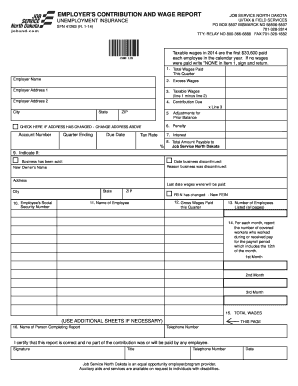
Get Sfn41263 Employer's Contribution And Wage Report 2014
How it works
-

Open form follow the instructions
-

Easily sign the form with your finger
-

Send filled & signed form or save
How to fill out the SFN41263 Employer's Contribution And Wage Report 2014 online
The SFN41263 Employer's Contribution And Wage Report 2014 is a vital document for employers to report their taxable wages and contributions to unemployment insurance. This guide provides a clear, step-by-step approach to filling out the form online.
Follow the steps to successfully complete your Employer's Contribution And Wage Report.
- Click ‘Get Form’ button to access the report form and open it in your preferred editor.
- Enter the employer name and address in the designated fields. Ensure all details are correct to avoid delays.
- In the 'Total Wages Paid This Quarter' section, input the total amount of wages paid to employees during the current reporting quarter.
- For 'Excess Wages', indicate any wages paid above the taxable threshold, if applicable.
- Calculate 'Taxable Wages' by subtracting line 2 ('Excess Wages') from line 1 ('Total Wages Paid'). Enter this amount on line 3.
- Multiply the taxable wages by the tax rate to determine the 'Contribution Due' and enter that amount on line 4.
- Calculate any interest due and input that amount on line 7.
- Sum all amounts in the 'Total Amount Payable to Job Service North Dakota' section.
- If applicable, indicate changes in ownership or business status in the relevant fields, providing new owner's name and applicable dates.
- Complete employee details including their Social Security number, name, gross wages for the quarter, and the number of employees listed.
- Report the number of covered workers for each month during the quarter in the designated fields. Use additional sheets if necessary.
- Enter your name, title, and contact information in the completion section, and certify the report by providing your signature.
- Once all information is accurately filled out, save your changes, and you may choose to download, print, or share the completed form as needed.
Complete your SFN41263 Employer's Contribution And Wage Report online today.
Register a new account Go to .uimn.org. Click Employers & Agents. Under I Need To... Register for an Account, click Employers. Click Employer Registration. The Employer Registration page opens. Fill in all requested information.
Industry-leading security and compliance
US Legal Forms protects your data by complying with industry-specific security standards.
-
In businnes since 199725+ years providing professional legal documents.
-
Accredited businessGuarantees that a business meets BBB accreditation standards in the US and Canada.
-
Secured by BraintreeValidated Level 1 PCI DSS compliant payment gateway that accepts most major credit and debit card brands from across the globe.