Loading
Form preview
  • US Legal Forms
  • Form Library
  • More Forms
  • More Uncategorized Forms
  • Ar920100z

Get Ar920100z

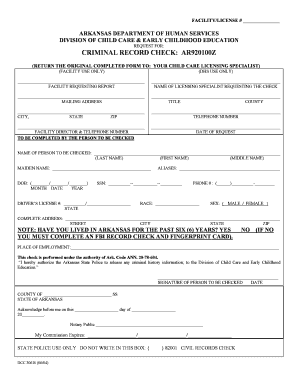
FACILITY/LICENSE # ARKANSAS DEPARTMENT OF HUMAN SERVICES DIVISION OF CHILD CARE & EARLY CHILDHOOD EDUCATION REQUEST FOR: CRIMINAL RECORD CHECK: AR920100Z (RETURN THE ORIGINAL COMPLETED FORM TO:.

How it works

  1. Open form

    Open form follow the instructions

  2. Easily sign form

    Easily sign the form with your finger

  3. Share form

    Send filled & signed form or save

How to fill out the Ar920100z online

Filling out the Ar920100z form is a crucial step in requesting a criminal record check for individuals involved in child care services. This guide provides a clear overview of the form's necessary components and offers step-by-step instructions for successful completion.

Follow the steps to complete the Ar920100z form online.

  1. Click the ‘Get Form’ button to access the Ar920100z and open it for editing.
  2. Begin by entering the facility request information. In the designated field, input the name of the facility requesting the report. This ensures that the correct institution is associated with the request.
  3. Provide the name of the licensing specialist requesting the criminal check in the appropriate section. This identifies the official who will manage the request.
  4. Fill in the mailing address for the facility. Ensure that it includes the street address, city, state, and ZIP code for accurate communication.
  5. Enter the title of the individual making the request along with the corresponding county. This information is pertinent for proper documentation.
  6. Record the city, state, and ZIP code of the submitting facility in the specified fields.
  7. Provide a telephone number for easy contact. This allows the licensing specialist to reach you if needed.
  8. Input the facility director's name and their corresponding telephone number. This identifies who is responsible at the facility.
  9. Enter the date of the request in the designated area. This indicates when the form was completed.
  10. Provide the name of the individual to be checked, ensuring accuracy in spelling the last, first, and middle names.
  11. If applicable, input the individual’s maiden name in the corresponding field.
  12. Record the date of birth in the specified format (month/date/year) for accurate identification.
  13. Include any aliases that the individual may have used in the relevant field.
  14. Input the individual's social security number, ensuring the number follows the correct format.
  15. Fill in the driver's license number and state of issuance in the corresponding fields to complete identification.
  16. Provide a contact phone number for the individual to be checked. This may be needed for any follow-up questions.
  17. Indicate the race of the individual in the appropriate section. This information may be required for processing.
  18. Select the appropriate sex designation (male or female) by marking the correct box.
  19. Complete the individual's address thoroughly with street, city, state, and ZIP code to ensure accurate processing.
  20. Answer the question regarding residence in Arkansas for the past six years by selecting yes or no.
  21. If the answer was no, a note states that an FBI record check and fingerprint card must be completed.
  22. List the current place of employment to provide additional context for the request.
  23. Authorize the Arkansas State Police to release any criminal history information by signing the form. This signature verifies consent.
  24. Include the date of the signature and the county where this authorization is made.
  25. Complete the notary public section, if required. Ensure all fields are filled out accurately, including commission expiration.
  26. Once all fields are completed accurately, users can save changes, download, print, or share the form as needed.

Complete your Ar920100z form online today for a smooth processing experience.

Get form

Experience a faster way to fill out and sign forms on the web. Access the most extensive library of templates available.
Get form

Related content

Child Care Centers - Arkansas Secretary of State
CRIMINAL RECORD CHECK: AR920100Z. (RETURN THE ORIGINAL COMPLETED FORM TO: YOUR CHILD CARE...
Learn more

Related links form

2017 Form 8453. U.S. Individual Income Tax Transmittal For An IRS E-file Return - Irs The Investors Registry, LLC Et Al. - Sec Indiana FCCLA Multiple Release Form Basic Nutrition Crossword

Questions & Answers

Get answers to your most pressing questions about US Legal Forms API.

Contact support

Use page breaks to control where a page ends and where a new page begins. Insert a page break. Place the cursor where you want to start a new page.

Next Page Section break starts the new section on the following page. Continuous Section break starts the new section on the same page. This type of section break is often used to change the number of columns without starting a new page. Even Page Section break starts a new section on the next even-numbered page.

Force text to the next line or page Click where you want the break to occur. Do one of the following: For a line break: Click. in the toolbar, then choose Line Break. You can also choose Insert > Line Break. For a page break: Click. in the toolbar, then choose Page Break. You can also choose Insert > Page Break.

Line break: Use a line break, also called a soft return, to start a new line without starting a new paragraph. Page break: Use a page break (in word-processing documents only) to move a line of text to the top of the next page or to start typing on a new page.

The first type of document break is the page break, which partitions only the body text of the document. Of this type there are three kinds: simple page breaks, column page breaks, and text wrapping page breaks.

Word automatically adds a break at the end of each page. You can also insert a manual page break anytime you want to start a new page in your document. Put your cursor where you want one page to end and the next to begin. Go to Insert > Page Break.

Try it! Select Layout. In the Paragraph group, select the small arrow. In the Paragraph dialog box, select Line and Page Breaks. Under Pagination, choose the option that works best for you: Widow/Orphan control. Keep with next. Keep lines together. Page break before.

Page breaks are used to end a page without filling it with text. To make sure the title page of your thesis/dissertation is separate from the signature page, for example, insert a page break after the graduation date on the title page.

Get This Form Now!

Use professional pre-built templates to fill in and sign documents online faster. Get access to thousands of forms.
Get form
If you believe that this page should be taken down, please follow our DMCA take down processhere.

Industry-leading security and compliance

US Legal Forms protects your data by complying with industry-specific security standards.
  • In businnes since 1997
    25+ years providing professional legal documents.
  • Accredited business
    Guarantees that a business meets BBB accreditation standards in the US and Canada.
  • Secured by Braintree
    Validated Level 1 PCI DSS compliant payment gateway that accepts most major credit and debit card brands from across the globe.
Get Ar920100z
Get form
  • Adoption
  • Bankruptcy
  • Contractors
  • Divorce
  • Home Sales
  • Employment
  • Identity Theft
  • Incorporation
  • Landlord Tenant
  • Living Trust
  • Name Change
  • Personal Planning
  • Small Business
  • Wills & Estates
  • Packages A-Z
  • Affidavits
  • Bankruptcy
  • Bill of Sale
  • Corporate - LLC
  • Divorce
  • Employment
  • Identity Theft
  • Internet Technology
  • Landlord Tenant
  • Living Wills
  • Name Change
  • Power of Attorney
  • Real Estate
  • Small Estates
  • Wills
  • All Forms
  • Forms A-Z
  • Form Library
  • Legal Hub
  • About Us
  • Help Portal
  • Legal Resources
  • Blog
  • Affiliates
  • Contact Us
  • Delete My Account
  • Site Map
  • Industries
  • Forms in Spanish
  • Localized Forms
  • State-specific Forms
  • Forms Kit
  • Real Estate Handbook
  • All Guides
  • Notarize
  • Incorporation services
  • For Consumers
  • For Small Business
  • For Attorneys
  • USLegal
  • FormsPass
  • pdfFiller
  • signNow
  • altaFlow
  • DocHub
  • Instapage
Form Packages
  • Adoption
  • Bankruptcy
  • Contractors
  • Divorce
  • Home Sales
  • Employment
  • Identity Theft
  • Incorporation
  • Landlord Tenant
  • Living Trust
  • Name Change
  • Personal Planning
  • Small Business
  • Wills & Estates
  • Packages A-Z
Form Categories
  • Affidavits
  • Bankruptcy
  • Bill of Sale
  • Corporate - LLC
  • Divorce
  • Employment
  • Identity Theft
  • Internet Technology
  • Landlord Tenant
  • Living Wills
  • Name Change
  • Power of Attorney
  • Real Estate
  • Small Estates
  • Wills
  • All Forms
  • Forms A-Z
  • Form Library
Customer Service
  • Legal Hub
  • About Us
  • Help Portal
  • Legal Resources
  • Blog
  • Affiliates
  • Contact Us
  • Delete My Account
  • Site Map
  • Industries
  • Forms in Spanish
  • Localized Forms
  • State-specific Forms
  • Forms Kit
Legal Guides
  • Real Estate Handbook
  • All Guides
Prepared for you
  • Notarize
  • Incorporation services
Our Customers
  • For Consumers
  • For Small Business
  • For Attorneys
Our Sites
  • USLegal
  • FormsPass
  • pdfFiller
  • signNow
  • altaFlow
  • DocHub
  • Instapage
Social Media
Call us now toll free:
+1 833 426 79 33
As seen in:
© Copyright 1999-2026 airSlate Legal Forms, Inc. 3720 Flowood Dr, Flowood, Mississippi 39232
  • Your Privacy Choices
  • Terms of Service
  • Privacy Notice
  • Content Takedown Policy
  • Bug Bounty Program