Loading
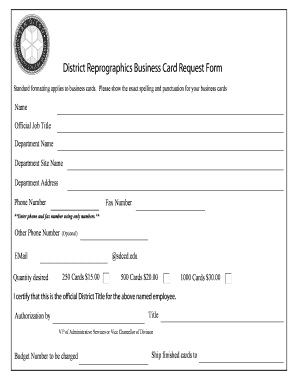
Get District Reprographics Business Card Request Form - Sdccd ...
How it works
-

Open form follow the instructions
-

Easily sign the form with your finger
-

Send filled & signed form or save
How to fill out the District Reprographics Business Card Request Form - SDCCD online
Filling out the District Reprographics Business Card Request Form is a straightforward process that enables users to create customized business cards. This guide provides clear instructions on how to fill out the form online, ensuring a smooth experience for all users.
Follow the steps to successfully complete the business card request form.
- Click ‘Get Form’ button to obtain the form and open it in the editor.
- In the 'Name' field, enter your full name as you would like it to appear on the business card. Ensure the spelling is accurate.
- In the 'Official Job Title' field, input your current job title. This should reflect your position within the district.
- Fill in the 'Department Name' section with the name of your department to indicate your affiliation.
- Complete the 'Department Site Name' field by providing the name of the specific site related to your department.
- In the 'Department Address' section, enter the official address for your department. This should include street address, city, state, and zip code.
- Input your 'Phone Number' using only numerical digits without dashes or spaces. This ensures accuracy and clarity.
- Provide a 'Fax Number' in the same numerical format as the phone number, if applicable.
- If you have an additional contact number, you can enter it in the 'Other Phone Number' field, which is optional.
- For the email address, insert your official district email, ensuring it ends with '@sdccd.edu'.
- Indicate the 'Quantity desired' by selecting the number of cards you wish to order. Options typically include 250, 500, or 1000 cards, with corresponding costs outlined.
- Review the statement, 'I certify that this is the official District Title for the above named employee.' Ensure you understand this certification as it affirms the accuracy of the information provided.
- In the 'Title' field, enter your title to assert the certification mentioned before.
- Authorize the request by entering the name of the Vice President of Administrative Services or Vice Chancellor of Division in the appropriate section.
- Provide the 'Budget Number' that will be charged for this request.
- Specify the destination by entering where the finished cards should be shipped to.
- Once all fields are completed to your satisfaction, you can choose to save your changes, download the document, print it, or share it as needed.
Complete your District Reprographics Business Card Request Form online today for a seamless process.