Loading
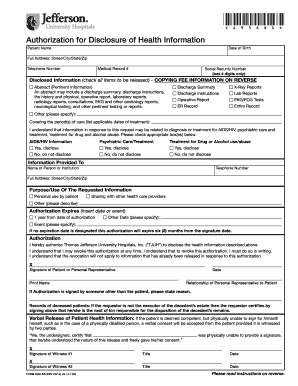
Get Authorization For Disclosure Of Health Information - Jefferson ...
How it works
-

Open form follow the instructions
-

Easily sign the form with your finger
-

Send filled & signed form or save
How to fill out the Authorization For Disclosure Of Health Information - Jefferson online
This guide provides clear and supportive instructions for completing the Authorization For Disclosure Of Health Information - Jefferson online. By following these steps, you can ensure that your health information is accurately disclosed while maintaining control over your personal data.
Follow the steps to complete the form accurately
- Click the ‘Get Form’ button to obtain the Authorization for Disclosure of Health Information form and open it in your PDF editor.
- Begin by filling in the patient’s name and date of birth. Accurate identification is crucial for processing the request without delays.
- Provide the full address, including street, city, state, and zip code. This information may help verify the identity of the patient.
- Enter the telephone number. A contact number is necessary for follow-ups or clarifications regarding the request.
- Include the medical record number to speed up retrieval and prevent any mix-ups with other patients' information.
- Fill in the last four digits of the social security number. This adds an extra layer of identification without disclosing full social security details.
- In the disclosed information section, check all items to be released according to your preferences, ensuring you understand each option's implications.
- List the applicable dates of treatment in the 'covering the period(s) of care' section, which defines the time frame for the requested information.
- Select the appropriate boxes regarding sensitive health information, if applicable, indicating whether you authorize disclosure for AIDS/HIV information, psychiatric care, or treatment for drug/alcohol use.
- In the 'information provided to' section, enter the name, telephone number, and full address of the person or institution receiving the health information.
- Specify the purpose or use of the requested information from the given options or elaborate in the space provided.
- Choose the expiration date for the authorization, ensuring it aligns with your needs. Remember that if no date is provided, the authorization will expire six months from the signature date.
- Sign and date the form, ensuring the signature is that of the patient or authorized representative. If signed by a representative, include their relationship to the patient.
- If applicable, ensure that a witness signature is obtained if the patient is deemed physically unable to sign.
- Finally, save any changes made to the form, and choose to download, print, or share it as necessary. Make sure to mail the completed form to the provided address.
Complete your documents online for efficient management of your health information.
The authorization form (sometimes called a patient HIPAA consent form), essentially serves as a handy dandy permission slip allowing a practice or business associate to use or disclose protected health information (PHI) in the ways a patient wants their data used.
Industry-leading security and compliance
US Legal Forms protects your data by complying with industry-specific security standards.
-
In businnes since 199725+ years providing professional legal documents.
-
Accredited businessGuarantees that a business meets BBB accreditation standards in the US and Canada.
-
Secured by BraintreeValidated Level 1 PCI DSS compliant payment gateway that accepts most major credit and debit card brands from across the globe.