Loading
Get P10 Form
How it works
-

Open form follow the instructions
-

Easily sign the form with your finger
-

Send filled & signed form or save
How to fill out the P10 Form online
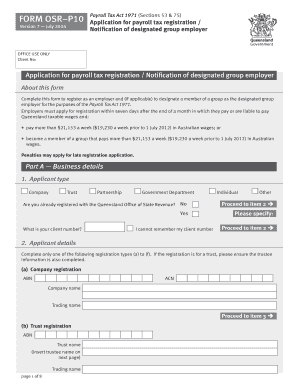
This guide provides clear and detailed instructions on how to fill out the P10 Form online for payroll tax registration. Whether you are a company, trust, partnership, or individual, these steps will help you complete the form efficiently and accurately.
Follow the steps to complete your P10 Form online
- Press the ‘Get Form’ button to access the P10 Form and open it in the online editor.
- Select your applicant type from the options provided: Company, Trust, Partnership, Government Department, Individual, or Other.
- Complete the applicant details section. Choose the specific registration type applicable to you, and fill in the required information, including ABN, ACN, and trading name.
- Fill in your contact details, including street address, postal address, telephone, and email address.
- Provide information about your employment history in Australia by listing the dates you commenced employment and paying wages in each relevant state.
- If applicable, answer questions regarding the grouping of employers and designate a group employer if needed.
- Input the taxable wages, specifying the current financial year as well as the previous five years as required.
- Address any rebates for apprentice and trainee wages if applicable, stating the required amounts.
- Complete the client support section, indicating how you became aware of your payroll tax liability.
- Sign and date the declaration section to confirm the information submitted is true and correct.
- Finally, save your changes, download, print, or share the completed P10 Form as necessary.
Begin filling out your documents online today to ensure timely payroll tax registration.
Create your account You can set up your online account here. Apply for your PTIN Complete the online application. ... Pay Your Fee It costs $50 to obtain a PTIN. ... Get Your PTIN Once you've provided the information and paid your fee, the IRS will provide your PTIN online.