Loading
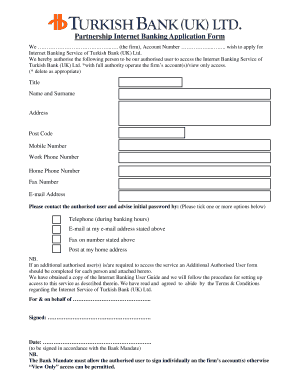
Get Turkish Bank Opening Form
How it works
-

Open form follow the instructions
-

Easily sign the form with your finger
-

Send filled & signed form or save
How to fill out the Turkish Bank Opening Form online
Filling out the Turkish Bank Opening Form online can streamline the process for opening an account. This guide will provide you with clear, step-by-step instructions to ensure that you complete the form accurately and efficiently.
Follow the steps to successfully complete your online form.
- Click ‘Get Form’ button to access the Turkish Bank Opening Form and open it in your preferred editor.
- In the first section, enter your firm’s name and account number clearly.
- Specify the person you wish to authorize by filling in their title, name, and surname in the designated fields.
- Provide the authorized user's contact details, including their address, post code, mobile number, work phone number, home phone number, fax number, and email address.
- Indicate your preferred method of contact for the initial password by ticking one or more options: telephone, email, fax, or post.
- If you need to add more authorized users, complete the Additional Authorized User Form and attach it.
- Review the agreement regarding the Internet Banking User Guide and confirm that you have read and understood the Terms & Conditions by ticking the relevant boxes.
- Sign the form on behalf of the firm, ensuring it is signed in accordance with the Bank Mandate.
- Finally, save your changes, download the form if needed, or print it for your records.
Complete your Turkish Bank Opening Form online now!
Related links form
Can I open UK Non-resident account in Turkish Bank UK, London? Yes, you can. Given that you fit the criteria and provide documents required, your account opening request will be considered. If successful your application will be processed.