Loading
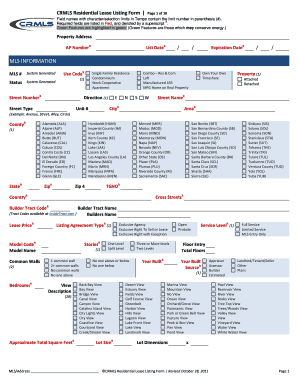
Get Crmls Residential Lease Form
How it works
-

Open form follow the instructions
-

Easily sign the form with your finger
-

Send filled & signed form or save
How to fill out the Crmls Residential Lease Form online
Filling out the Crmls Residential Lease Form online can streamline the rental process for both landlords and tenants. This guide provides a clear, step-by-step approach to help users navigate the form's sections and fields effectively.
Follow the steps to complete the online lease form successfully.
- Click the ‘Get Form’ button to access the Crmls Residential Lease Form and view it in the online editor.
- Begin by filling in the 'Property Address' section, which includes details such as the street number, street name, city, state, and zip code. Ensure to provide complete and accurate information.
- Input the 'AP Number' and 'List Date,' which are required fields marked in red. These details are essential for MLS identification.
- Select the appropriate 'Use Code' for the property, like 'Single Family Residence' or 'Condominium'. This classification helps in proper categorization within your listing.
- Fill out the 'Status' field, which is system-generated. Double-check that your listing status reflects the correct phase of the leasing process.
- In the 'Bedrooms' and 'Total Bathrooms' fields, provide the number of each type relevant to the property. Accurate information is crucial for potential tenants.
- Complete the 'Lease Price' and 'Security Deposit' sections, ensuring these figures align with your leasing terms.
- After all required fields are filled, review your entries for accuracy. Ensure that all information is complete and complies with the guidelines.
- Once satisfied with the content, proceed to save your changes, and you have the option to download, print, or share the completed form.
Start filling out your Crmls Residential Lease Form online today!
Post-Graduate Diploma- Post-graduate diploma degrees are for individuals who have gone through their undergraduate studies, but for carer advancement, the students are looking for career specialisations. Such diplomas are pursued only after obtaining a bachelor's degree and are considered a higher level of education.