Loading
Get Sbbjonline
How it works
-

Open form follow the instructions
-

Easily sign the form with your finger
-

Send filled & signed form or save
How to fill out the Sbbjonline online
Filling out the Sbbjonline registration form is a crucial step towards accessing the State Bank of Bikaner and Jaipur's internet banking services. This guide will provide a clear and structured approach to completing the form, ensuring that users can navigate each section with confidence.
Follow the steps to successfully complete the Sbbjonline registration form.
- Click 'Get Form' button to obtain the form and open it in the editor.
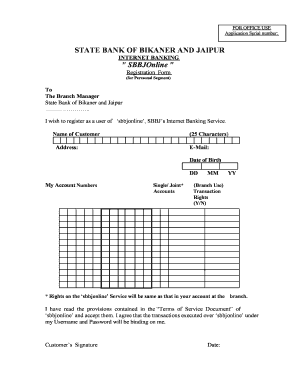
- Begin by entering your name in the designated field. Ensure that your name does not exceed 25 characters, as this is the maximum limit set by the form.
- Provide your complete address in the address field. Ensure that your address is current and accurate to facilitate seamless communication from your bank.
- Next, enter your email address in the appropriate field. This will be used for account-related notifications, so use a valid email you check regularly.
- Fill in your date of birth using the format DD/MM/YYYY. This information may be used for verification purposes.
- List your account numbers in the field provided. If you hold multiple accounts, note that you must specify whether they are single or joint accounts.
- In the section regarding transaction rights, indicate your preference by answering 'Yes' or 'No'. Remember that transaction rights will be aligned with your arrangements made at the branch.
- Acknowledge reading and accepting the 'Terms of Service Document' by checking the relevant box before signing the form.
- Sign and date the form to confirm your application. Providing your signature is essential as it signifies your agreement to the terms and conditions outlined by the bank.
- Once all fields are accurately completed, you can proceed to save changes, download a copy for your records, or print the form directly from the editor.
Ensure you complete your Sbbjonline registration form online today for seamless internet banking access.
We can wrap text in a LaTeX table by using the p specification in the tabular environment. Then, we'll be able to break lines as per the specified width of the columns. To obtain control over the justification of text, we can use the ragged2e package that permits us to produce pleasant-looking and compact tables.