Loading
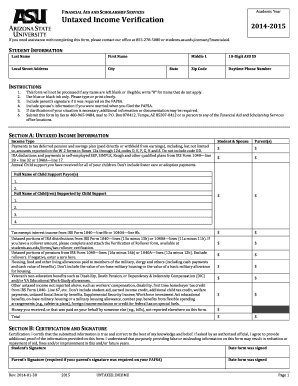
Get 2014-2015 Untaxed Income Verification Form - Asu Students Site - Students Asu
How it works
-

Open form follow the instructions
-

Easily sign the form with your finger
-

Send filled & signed form or save
How to fill out the 2014-2015 Untaxed Income Verification Form - ASU Students Site - Students Asu online
Completing the 2014-2015 Untaxed Income Verification Form is essential for ensuring accurate financial aid assessments. This guide will provide you with clear instructions and helpful information to assist you in filling out the form efficiently.
Follow the steps to accurately complete the form.
- Press the ‘Get Form’ button to obtain the form and open it in your preferred editor for completion.
- Start by entering your personal information in the 'Student Information' section. Include your last name, first name, local street address, city, state, middle initial, 10-digit ASU ID, zip code, and daytime phone number.
- Follow the instructions provided at the top of the form. Ensure that no items are left blank; if any section does not apply to you, write '0' for those items. Use blue or black ink and write clearly.
- If required, include your parent's signature and your spouse's information if you were married at the time you filed your FAFSA.
- Proceed to 'Section A: Untaxed Income Information'. Fill in the income types accurately, including child support received, tax-exempt interest income, and other untaxed income as listed, making sure to report amounts in the correct fields.
- Provide the total amount of untaxed income from all applicable categories and ensure this section is complete.
- In 'Section B: Certification and Signature,' you must certify that the information you provided is correct. Sign and date the form, and include your parent’s signature if it is required.
- Once completed, save your changes. You can choose to download, print, or share the form as needed. Ensure to submit it by fax, mail, or in person to the designated Financial Aid office.
Complete your 2014-2015 Untaxed Income Verification Form online today to ensure your financial aid assessment is accurate.
It should be large enough to capture attention and convey a message, but shouldn't take over the browser window or block users from completing other tasks. Allow the banner to scroll along with the surrounding content, since fixed positioning on the page or screen can obstruct other elements or disorient the viewer.
Industry-leading security and compliance
US Legal Forms protects your data by complying with industry-specific security standards.
-
In businnes since 199725+ years providing professional legal documents.
-
Accredited businessGuarantees that a business meets BBB accreditation standards in the US and Canada.
-
Secured by BraintreeValidated Level 1 PCI DSS compliant payment gateway that accepts most major credit and debit card brands from across the globe.