Loading
Form preview
  • US Legal Forms
  • Other Templates
  • More Forms
  • More Uncategorized Forms
  • School Food Service Employee Evaluation Form

Get School Food Service Employee Evaluation Form

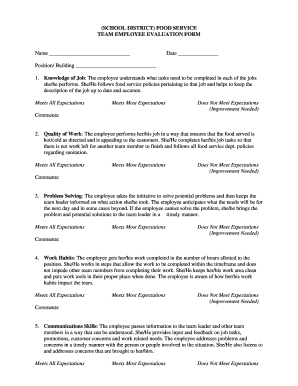
(SCHOOL DISTRICT) FOOD SERVICE TEAM EMPLOYEE EVALUATION FORM Name Date Position/ Building 1. Knowledge of Job: The employee understands what tasks need to be completed in each of the jobs she/he performs.

How it works

  1. Open form

    Open form follow the instructions

  2. Easily sign form

    Easily sign the form with your finger

  3. Share form

    Send filled & signed form or save

How to fill out the School Food Service Employee Evaluation Form online

Filling out the School Food Service Employee Evaluation Form online is a straightforward process that can enhance the evaluation of employees' performance. This guide provides a clear and user-friendly overview to ensure you complete the form accurately and effectively.

Follow the steps to complete the evaluation form successfully.

  1. Click ‘Get Form’ button to obtain the form and open it in the editor.
  2. Begin by entering the employee's name in the designated field at the top of the form.
  3. Next, input the current date to document when the evaluation is being completed.
  4. Fill in the position and building where the employee works to provide context for the evaluation.
  5. Address each evaluation category, starting with 'Knowledge of Job.' Select one of the options: 'Meets All Expectations,' 'Meets Most Expectations,' or 'Does Not Meet Expectations (Improvement Needed).' Provide comments to clarify your assessment.
  6. Proceed to evaluate the 'Quality of Work' in the same manner as the previous step, selecting an option and offering comments as needed.
  7. Continue through the following sections: 'Problem Solving,' 'Work Habits,' 'Communications Skills,' 'Team Work,' 'Customer Service Skills,' and 'Professional Appearance.' For each section, assess the employee's performance by selecting the appropriate option and providing comments.
  8. Once all categories are evaluated, summarize the employee's primary strengths and focus areas for improvement in the provided fields.
  9. Finalize the evaluation by entering your name in the 'Evaluated by' field and the date of the evaluation.
  10. Finally, have the employee sign and date the form acknowledging the evaluation.
  11. After completing the form, make sure to save your changes. You can then download, print, or share the completed evaluation form as required.

Start filling out the School Food Service Employee Evaluation Form online today to effectively assess employee performance.

Get form

Experience a faster way to fill out and sign forms on the web. Access the most extensive library of templates available.
Get form

Related content

Designing Your Employee Training Plan - Arizona...
school nutrition programs for all schools under the LEA. This is the individual who plans...
Learn more
Developing a performance criteria model for school...
Human subjects review approval form for questionnaire 1. 86 ... criteria, school...
Learn more
Dismissal (employment) - Wikipedia
Dismissal is the termination of employment by an employer against the will of the...
Learn more

Related links form

ALTERNATE DUTY/LEAVE FORM - Langara College Busking Application Form - Oxford City Council - Oxford Gov Deq Form 605 R04b Gift In Kind Donation Form - Langara College

Questions & Answers

Get answers to your most pressing questions about US Legal Forms API.

Contact support

How do you write a performance evaluation? Identify core competencies. ... Choose a rating scale. ... Set an evaluation cycle. ... Prepare a list of questions. ... Share questions in advance. ... Have the conversation. ... Create a goal-setting framework. ... Be open to feedback.

Benchmarking is one of the best ways to measure employee performance against company standards. Benchmarking provides you the opportunity to measure the progress of your employees against other organizations within your industry.

An employee evaluation form is a performance review tool used to track employee progress by collecting information about employees' skills, goals, and accomplishments.

Evaluation Forms Examples Employee Evaluation Form. Customer Service Evaluation Form. Peer Evaluation Form. Performance Improvement Plan Form. Event Evaluation Form. Training Course Feedback Template.

Certainly, the most popular method of evaluation used in organizations today is the graphic rating scale. One study found that 57 percent of the organizations surveyed used rating scales, and another study found the figure to be 65 percent.

Employee performance reviews should cover communication, collaboration, reliability, work quality, problem-solving, and timeliness. Give regular, informal feedback consistently. In formal reviews, be honest, hold face-to-face conversations, give relevant examples, and end on a positive note.

“You always deliver work ahead of schedule and never forget any details.” "One of your greatest strengths is your ability to manage multiple responsibilities.” "This year, you've demonstrated your ability to take on new projects while also meeting your day-to-day goals.”

A ratings scale—or grading system—is probably the most commonly used performance review method. This method is based on a set of employer-developed criteria—which can include behaviors, traits, competencies, or completed projects—against which employees are judged.

Get This Form Now!

Use professional pre-built templates to fill in and sign documents online faster. Get access to thousands of forms.
Get form
If you believe that this page should be taken down, please follow our DMCA take down processhere.
Get School Food Service Employee Evaluation Form
Get form
  • Adoption
  • Bankruptcy
  • Contractors
  • Divorce
  • Home Sales
  • Employment
  • Identity Theft
  • Incorporation
  • Landlord Tenant
  • Living Trust
  • Name Change
  • Personal Planning
  • Small Business
  • Wills & Estates
  • Packages A-Z
  • Affidavits
  • Bankruptcy
  • Bill of Sale
  • Corporate - LLC
  • Divorce
  • Employment
  • Identity Theft
  • Internet Technology
  • Landlord Tenant
  • Living Wills
  • Name Change
  • Power of Attorney
  • Real Estate
  • Small Estates
  • Wills
  • All Forms
  • Forms A-Z
  • Other Templates
  • Legal Hub
  • About Us
  • Help Portal
  • Legal Resources
  • Blog
  • Affiliates
  • Contact Us
  • Delete My Account
  • Site Map
  • Industries
  • Forms in Spanish
  • Localized Forms
  • State-specific Forms
  • Forms Kit
  • Real Estate Handbook
  • All Guides
  • Notarize
  • Incorporation services
  • For Consumers
  • For Small Business
  • For Attorneys
  • USLegal
  • FormsPass
  • pdfFiller
  • signNow
  • altaFlow
  • DocHub
  • Instapage
Form Packages
  • Adoption
  • Bankruptcy
  • Contractors
  • Divorce
  • Home Sales
  • Employment
  • Identity Theft
  • Incorporation
  • Landlord Tenant
  • Living Trust
  • Name Change
  • Personal Planning
  • Small Business
  • Wills & Estates
  • Packages A-Z
Form Categories
  • Affidavits
  • Bankruptcy
  • Bill of Sale
  • Corporate - LLC
  • Divorce
  • Employment
  • Identity Theft
  • Internet Technology
  • Landlord Tenant
  • Living Wills
  • Name Change
  • Power of Attorney
  • Real Estate
  • Small Estates
  • Wills
  • All Forms
  • Forms A-Z
  • Other Templates
Customer Service
  • Legal Hub
  • About Us
  • Help Portal
  • Legal Resources
  • Blog
  • Affiliates
  • Contact Us
  • Delete My Account
  • Site Map
  • Industries
  • Forms in Spanish
  • Localized Forms
  • State-specific Forms
  • Forms Kit
Legal Guides
  • Real Estate Handbook
  • All Guides
Prepared for you
  • Notarize
  • Incorporation services
Our Customers
  • For Consumers
  • For Small Business
  • For Attorneys
Our Sites
  • USLegal
  • FormsPass
  • pdfFiller
  • signNow
  • altaFlow
  • DocHub
  • Instapage
Social Media
Call us now toll free:
+1 833 426 79 33
As seen in:
© Copyright 1999-2026 airSlate Legal Forms, Inc. 17 Station Street, Ste. 203, Brookline, MA 02445
  • Your Privacy Choices
  • Terms of Service
  • Privacy Notice
  • Content Takedown Policy
  • Bug Bounty Program