Loading
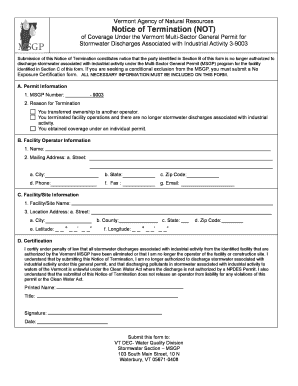
Get Deq Form 605 R04b
How it works
-

Open form follow the instructions
-

Easily sign the form with your finger
-

Send filled & signed form or save
How to fill out the Deq Form 605 R04b online
This guide provides a clear and comprehensive approach to filling out the Deq Form 605 R04b online. By following these instructions, users will be able to complete the form accurately and efficiently, ensuring all required information is provided.
Follow the steps to successfully complete the form:
- Press the ‘Get Form’ button to access the form and open it in the editor.
- In Section A, input the MSGP number, which is '9003', and select the appropriate reason for termination from the provided options.
- Proceed to Section B and fill out the facility operator information. This includes entering the name, mailing address (street, city, state, zip code), phone number, fax number, and email address.
- In Section C, provide the facility/site name and complete the location address. Include the street, city, county, state, zip code, and the latitude and longitude coordinates.
- In Section D, read the certification statement carefully. Confirm your understanding and certification by entering your printed name, title, signature, and date.
- Once all sections are complete, review your entries for accuracy. You can then save your changes, download, print, or share the completed form as needed.
Complete your documents online with confidence today.