We use cookies to improve security, personalize the user experience, enhance our marketing activities (including cooperating with our marketing partners) and for other business use.
Click "here" to read our Cookie Policy. By clicking "Accept" you agree to the use of cookies. Read less
Read more
Accept
Loading
Form preview
  • US Legal Forms
  • Form Library
  • More Forms
  • More Uncategorized Forms
  • Risk Impact Assessments In Project Budget Development: Quantity...

Get Risk Impact Assessments In Project Budget Development: Quantity...

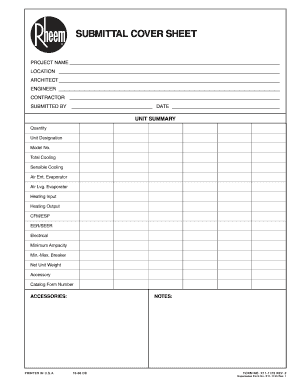
SUBMITTAL COVER SHEET PROJECT NAME LOCATION ARCHITECT ENGINEER CONTRACTOR SUBMITTED BY DATE UNIT SUMMARY Quantity Unit Designation Model No. Total Cooling Sensible Cooling Air Ent. Evaporator Air.

How it works

  1. Open form

    Open form follow the instructions

  2. Easily sign form

    Easily sign the form with your finger

  3. Share form

    Send filled & signed form or save

How to fill out the Risk Impact Assessments In Project Budget Development: Quantity... online

This guide provides an expert analysis on how to effectively fill out the Risk Impact Assessments in Project Budget Development: Quantity... form online. This resource is designed to assist users of all experience levels in navigating the form efficiently.

Follow the steps to complete the form accurately.

  1. Press the ‘Get Form’ button to access the form and open it in your browser.
  2. Enter the project name in the designated field at the top of the form. Ensure that each entry is clear and accurately represents the project.
  3. Fill in the location field with the specific site where the project will take place. This should include any pertinent details that may affect the assessment.
  4. Provide the names of the architect, engineer, and contractor. It is crucial to include all relevant parties involved in the project to ensure transparency and accountability.
  5. Complete the 'Submitted By' section, including your name and the date of submission. This identifies the individual responsible for the information provided.
  6. In the unit summary section, input detailed quantities and specifications such as total cooling, heating input, and electrical data. Ensure that all values are accurate and align with project requirements.
  7. Review the accessories section carefully, indicating any additional components required for the project. Accurate naming here is vital to avoid misunderstandings later.
  8. Make any additional notes in the designated 'Notes' section that might assist reviewers or future references regarding the project specifics.
  9. Once all fields are completed, ensure to save your changes. You can then choose to download, print, or share the form as needed.

Complete your Risk Impact Assessments online today for efficient project management.

Get form

Experience a faster way to fill out and sign forms on the web. Access the most extensive library of templates available.
Get form

Related content

Sample Risk Analysis Report - Louisiana Coastal...
This report discusses the cost and schedule risk analysis (CSRA) process and ... includes...
Learn more
3 Properties of Project Risks | The Owner's Role...
Identification and analysis of project risks are required for effective risk ... not in...
Learn more
Risk assessment - Wikipedia
Broadly speaking, a risk assessment is the combined effort of: identifying and analyzing...
Learn more

Related links form

ENCROACHMENT PERMIT APPLICATION 1 ... - City Of Aliso Viejo CITY OF A V D P S Planning Application FORM PS-200 Mdm Monthly Report Form Pdf Form IT-360.1:2012:Change Of City Resident Status:it3601

Questions & Answers

Get answers to your most pressing questions about US Legal Forms API.

Contact support

Step 1: Hazard identification. This is the process of examining each work area and work task for the purpose of identifying all the hazards which are “inherent in the job”. ... Step 2: Risk identification. Step 3: Risk assessment. Step 4: Risk control. ... Step 5: Documenting the process. ... Step 6: Monitoring and reviewing.

Risk impact assessment is the process of assessing the probabilities and consequences of risk events if they are realized. The critical third step in the risk management process is risk management assessment and prioritization. Other steps include: Risk Identification.

Here is a six-step plan that can help you identify and manage risk before things get out of hand. Include risk management in your projects. ... Communicate risks to others. ... Prioritize risks. ... Analyze risks. ... Implement risk responses as early as possible. ... Track them down regularly.

There are four common ways to mitigate risks, including avoiding them, accepting them, reducing them, and transferring them. Deciding which approach to use for each risk isn't an exact science, and you'll have to use your judgment and expertise to determine which is best.

Budgeting risks are the potential for certain items to deviate from the originally predicted cost. Creating a budget involves making estimates about the future, which can include some risk of inaccuracy.

5 ways to limit budget risks Risk avoidance. This strategy involves identifying potential risks, then changing the project plan or budget to avoid them. ... Risk monitoring. ... Risk controlling. ... Risk sharing. ... Risk transfer. ... Refine your risk assessment strategy. ... Prepare for some risk acceptance. ... Be aware of scope creep.

Project cost risk is the risk that a project will spend more money than was originally budgeted. It will either lead to an overspend on the project or a reduction in the deliverables as money is pulled from other areas to compensate for increased costs.

Here are seven tips to help keep reigns on your budget. Thorough Project Planning. The best way to stop cost overrun is to plan against it before executing a project. ... Know Your Vendors. ... Keep to Planned Scope. ... Use a Project Planning Tool. ... Keep Stakeholders Updated. ... Monitor Progress. ... Reassign Resources.

Get This Form Now!

Use professional pre-built templates to fill in and sign documents online faster. Get access to thousands of forms.
Get form
If you believe that this page should be taken down, please follow our DMCA take down processhere.

Industry-leading security and compliance

US Legal Forms protects your data by complying with industry-specific security standards.
  • In businnes since 1997
    25+ years providing professional legal documents.
  • Accredited business
    Guarantees that a business meets BBB accreditation standards in the US and Canada.
  • Secured by Braintree
    Validated Level 1 PCI DSS compliant payment gateway that accepts most major credit and debit card brands from across the globe.
Get Risk Impact Assessments In Project Budget Development: Quantity...
Get form
Form Packages
Adoption
Bankruptcy
Contractors
Divorce
Home Sales
Employment
Identity Theft
Incorporation
Landlord Tenant
Living Trust
Name Change
Personal Planning
Small Business
Wills & Estates
Packages A-Z
Form Categories
Affidavits
Bankruptcy
Bill of Sale
Corporate - LLC
Divorce
Employment
Identity Theft
Internet Technology
Landlord Tenant
Living Wills
Name Change
Power of Attorney
Real Estate
Small Estates
Wills
All Forms
Forms A-Z
Form Library
Customer Service
Terms of Service
Privacy Notice
Legal Hub
Content Takedown Policy
Bug Bounty Program
About Us
Help Portal
Legal Resources
Blog
Affiliates
Contact Us
Delete My Account
Site Map
Industries
Forms in Spanish
Localized Forms
State-specific Forms
Forms Kit
Legal Guides
Real Estate Handbook
All Guides
Prepared for You
Notarize
Incorporation services
Our Customers
For Consumers
For Small Business
For Attorneys
Our Sites
US Legal Forms
USLegal
FormsPass
pdfFiller
signNow
airSlate WorkFlow
DocHub
Instapage
Social Media
Call us now toll free:
+1 833 426 79 33
As seen in:
  • USA Today logo picture
  • CBC News logo picture
  • LA Times logo picture
  • The Washington Post logo picture
  • AP logo picture
  • Forbes logo picture
© Copyright 1997-2025
airSlate Legal Forms, Inc.
3720 Flowood Dr, Flowood, Mississippi 39232
Form Packages
Adoption
Bankruptcy
Contractors
Divorce
Home Sales
Employment
Identity Theft
Incorporation
Landlord Tenant
Living Trust
Name Change
Personal Planning
Small Business
Wills & Estates
Packages A-Z
Form Categories
Affidavits
Bankruptcy
Bill of Sale
Corporate - LLC
Divorce
Employment
Identity Theft
Internet Technology
Landlord Tenant
Living Wills
Name Change
Power of Attorney
Real Estate
Small Estates
Wills
All Forms
Forms A-Z
Form Library
Customer Service
Terms of Service
Privacy Notice
Legal Hub
Content Takedown Policy
Bug Bounty Program
About Us
Help Portal
Legal Resources
Blog
Affiliates
Contact Us
Delete My Account
Site Map
Industries
Forms in Spanish
Localized Forms
State-specific Forms
Forms Kit
Legal Guides
Real Estate Handbook
All Guides
Prepared for You
Notarize
Incorporation services
Our Customers
For Consumers
For Small Business
For Attorneys
Our Sites
US Legal Forms
USLegal
FormsPass
pdfFiller
signNow
airSlate WorkFlow
DocHub
Instapage
Social Media
Call us now toll free:
+1 833 426 79 33
As seen in:
  • USA Today logo picture
  • CBC News logo picture
  • LA Times logo picture
  • The Washington Post logo picture
  • AP logo picture
  • Forbes logo picture
© Copyright 1997-2025
airSlate Legal Forms, Inc.
3720 Flowood Dr, Flowood, Mississippi 39232