Loading
Get Mbp-ap-00107091.doc. Supplemental Application - Grocery Store
How it works
-

Open form follow the instructions
-

Easily sign the form with your finger
-

Send filled & signed form or save
How to fill out the MBP-AP-00107091.doc. Supplemental Application - Grocery Store online
Filling out the MBP-AP-00107091 document is an essential step for those seeking to apply for a grocery store insurance policy. This guide provides you with clear and supportive instructions to navigate the application process smoothly.
Follow the steps to successfully complete your application
- Click ‘Get Form’ button to obtain the form and open it in your editor.
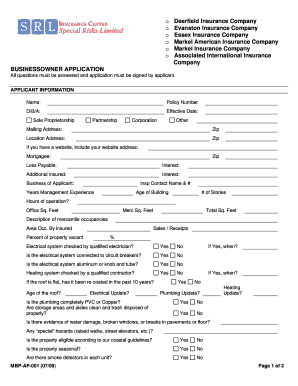
- Begin with the 'Applicant Information' section. Fill in your name and policy number. Provide your Doing Business As (D/B/A) name and the effective date of the application.
- Indicate your business structure by selecting one of the following options: Sole Proprietorship, Partnership, Corporation, or Other.
- Complete the mailing and location addresses, ensuring to include the zip codes for both fields.
- If applicable, provide your website address under the 'Website' section.
- Fill in details related to your mortgagee and the corresponding zip code.
- Describe your business by indicating the nature of your commercial activities and the contact information of the inspection contact person.
- Provide relevant metrics including years of management experience, age of the building, the number of stories, and hours of operation.
- Complete the 'Sales / Receipts' field by inputting the percentage of occupancy and specifying if the electrical and heating systems have been checked by qualified professionals.
- Answer questions about the physical condition of the property, including whether there has been water damage, presence of smoke detectors, and any special hazards.
- Proceed to the 'Loss History' section. Document any past claims by providing the date, type/description, amounts paid, previous carrier, and any reserves and premiums.
- Fill in the protection class, deductibles, and limits for building exposure. Choose the appropriate options for coverage types and additional protections.
- Finally, ensure that the applicant’s name, title, signature, and date are included at the end of the form.
- After you have completed the form, save your changes, and you have the option to download, print, or share the document online as needed.
Complete your application online to ensure you have the necessary insurance coverage for your grocery store.