Loading
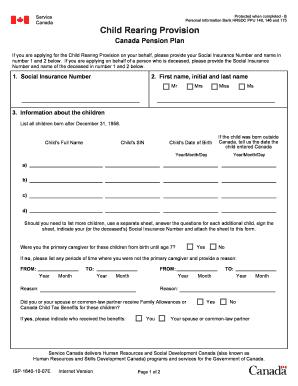
Get Child Rearing Provision Form, Cpp
How it works
-

Open form follow the instructions
-

Easily sign the form with your finger
-

Send filled & signed form or save
How to fill out the Child Rearing Provision Form, CPP online
The Child Rearing Provision Form, CPP is an important document for individuals applying for benefits under the Canada Pension Plan. This guide provides clear and detailed instructions on how to fill out the form online, ensuring you provide all necessary information accurately.
Follow the steps to complete the Child Rearing Provision Form, CPP online effectively.
- Click ‘Get Form’ button to obtain the form and open it in your preferred online editor.
- In the first section, enter your Social Insurance Number in the designated field. If you are completing the form for someone who has passed away, include the deceased person's Social Insurance Number.
- Fill in the full name of the applicant in the next field, including first name, initials, and last name. Use your title (Mr, Mrs, Miss, Ms) for identification.
- For the 'Information about the children' section, list full names and Social Insurance Numbers of all children born after December 31, 1958 in the provided fields. Also, indicate the date each child entered Canada if they were born outside of the country.
- Indicate whether you were the primary caregiver for each child from birth to age seven by selecting 'Yes' or 'No'. If 'No', provide specific time periods when you were not the primary caregiver and the reasons for that in the space provided.
- Answer if you or your spouse or common-law partner received Family Allowances or Canada Child Tax Benefits for these children and specify who received them.
- If applicable, list any periods during which you did not receive Family Allowances or Canada Child Tax Benefits when the children were under age seven, providing reasons for those gaps.
- In the signature section, declare that the information you have provided is true and complete. Sign and date the form, ensuring the date is formatted correctly.
- If completing for a deceased person, include additional required personal information, including your name, telephone number, and address in the specified fields.
- Lastly, read through the waiver of rights section if eligible, and complete it if you wish to waive rights in favor of the primary caregiver. Ensure that all information filled out is accurate and complete before submitting.
- After filling out the form, save your changes. You can choose to download, print, or share the completed form as needed.
Complete your Child Rearing Provision Form, CPP online today for a smooth application process.
The child-rearing provision reads as follows: "any months for which you received family benefits paid by the Québec government or the Canadian government for a child under 7 or the months for which you were eligible for such benefits but none were payable".
Industry-leading security and compliance
US Legal Forms protects your data by complying with industry-specific security standards.
-
In businnes since 199725+ years providing professional legal documents.
-
Accredited businessGuarantees that a business meets BBB accreditation standards in the US and Canada.
-
Secured by BraintreeValidated Level 1 PCI DSS compliant payment gateway that accepts most major credit and debit card brands from across the globe.