Get Affinity Insurance Services
How it works
-

Open form follow the instructions
-

Easily sign the form with your finger
-

Send filled & signed form or save
How to fill out the Affinity Insurance Services online
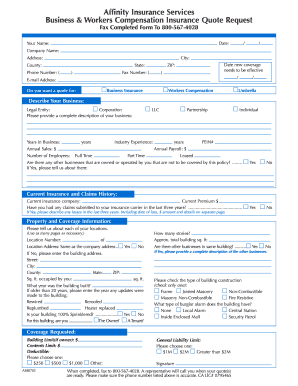
Filling out the Affinity Insurance Services form can be a straightforward process when guided correctly. This comprehensive guide will walk you through each section of the form, ensuring you have a clear understanding of what information is needed to facilitate your business and workers compensation insurance quote request.
Follow the steps to successfully complete your insurance quote request form.
- Click ‘Get Form’ button to obtain the form and open it in the editor.
- Begin by filling in your personal information, including your name, date, company name, address, city, county, state, phone number, and email address. Ensure accuracy, as this contact information is crucial for communication regarding your quote.
- Indicate the type of coverage you are seeking by selecting one or more options: Business Insurance, Workers Compensation, or Umbrella. This helps tailor the quotes you receive.
- Describe your business in detail. Start by selecting your legal entity type (Corporation, LLC, Partnership, or Individual) and provide basic information such as years in business, industry experience, annual sales, and payroll details.
- Input the number of employees categorized into full-time, part-time, and leased. Additionally, declare if there are other businesses owned or operated by you that are not to be covered under this policy.
- Provide details on your current insurance and claims history, including the current insurance company, premium, and any claims submitted over the past three years. Include descriptions of losses on a separate page if necessary.
- For property and coverage information, describe each location where your business operates. Specify location numbers, total building square footage, and whether the address is the same as the company address. Add additional details as required.
- Indicate any updates made to the building if it is older than 20 years. Check if the building is 100% sprinklered and confirm whether you are the owner or a tenant.
- Select the type of building construction and specify the burglar alarm type present in your building.
- Fill out the coverage requested section, including building and contents limits, and choose your deductible amount.
- Provide your signature at the end of the form to certify that the information provided is accurate.
- Once you have completed the form, fax it to 800-567-4028. A representative will reach out to you once your quotes are prepared.
Take the first step towards protecting your business by filling out the Affinity Insurance Services form online today.
Related links form
Affinity Insurance Services is not directly part of Medicaid; rather, it offers supplemental insurance options that may complement Medicaid coverage. If you qualify for Medicaid, it's essential to explore how Affinity options can enhance your existing benefits. Ensure you understand how these two systems work together to maximize your healthcare access.