Loading
Get Philhealth Duly Accredited Tb Dots Center Form
How it works
-

Open form follow the instructions
-

Easily sign the form with your finger
-

Send filled & signed form or save
How to fill out the Philhealth Duly Accredited Tb Dots Center Form online
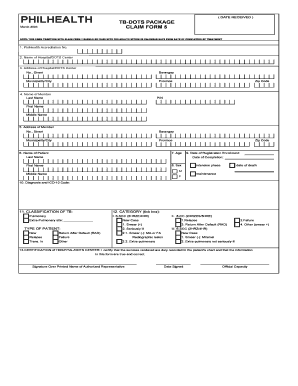
Filling out the Philhealth Duly Accredited Tb Dots Center Form is essential for users seeking to claim benefits related to tuberculosis treatment. This guide provides step-by-step instructions to ensure that users can complete the form accurately in an online format.
Follow the steps to complete the Philhealth form with ease.
- Press the ‘Get Form’ button to access the form and open it for editing.
- Locate the section for PhilHealth Accreditation Number and fill in the unique accreditation number associated with the hospital or DOTS center.
- Enter the name of the hospital or DOTS center in the corresponding field.
- Provide the complete address of the hospital or DOTS center, including the street number, barangay, municipality or city, province, and zip code.
- In the member information section, input the last name, first name, and middle name of the member, along with their zip code and PhilHealth Identification Number (PIN).
- Fill in the patient's name by writing their last name and first name.
- Provide the patient's age in the designated field.
- Select the patient's sex by marking either 'M' for male or 'F' for female.
- Indicate the date of registration enrollment and the date of completion of treatment.
- State the diagnosis along with the International Classification of Diseases (ICD-10) code in the respective fields.
- Classify the type of tuberculosis by selecting the appropriate category. Be sure to tick the relevant box for pulmonary or extra-pulmonary sites.
- Identify the type of patient by marking the appropriate option, such as relapse, failure, or new case, and provide further details as required.
- Complete the certification section by providing the signature over the printed name of the authorized representative, along with the date signed and their official capacity.
- Once all sections are completed, save changes, then download or print the form for submission.
Start filling out the Philhealth Duly Accredited Tb Dots Center Form online today to ensure your claims are processed promptly.
Invalid zip code error is displayed when attempting to process a payment from your customer with a billing address outside the U.S. They may have a ZIP code (or Province code) that includes characters that do not meet the U.S. 5 digit standard.
Industry-leading security and compliance
US Legal Forms protects your data by complying with industry-specific security standards.
-
In businnes since 199725+ years providing professional legal documents.
-
Accredited businessGuarantees that a business meets BBB accreditation standards in the US and Canada.
-
Secured by BraintreeValidated Level 1 PCI DSS compliant payment gateway that accepts most major credit and debit card brands from across the globe.