Loading
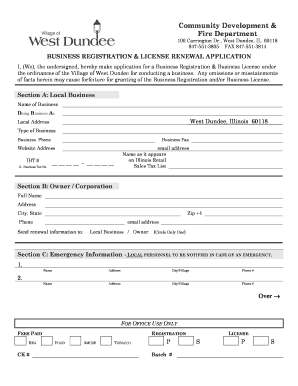
Get Community Development & Fire Department - Wdundee.org
How it works
-

Open form follow the instructions
-

Easily sign the form with your finger
-

Send filled & signed form or save
How to fill out the Community Development & Fire Department - Wdundee.org online
This guide provides step-by-step instructions for users looking to complete the Community Development & Fire Department online form. Whether you are registering a business or renewing a license, this resource aims to make the process straightforward and efficient.
Follow the steps to complete the online form effectively.
- Press the 'Get Form' button to access the form and open it in your preferred browser.
- Begin by filling out Section A, which requires your local business information. This includes the name of your business, doing business as (DBA) name, local address, type of business, business phone, fax number, website address, IBT number, Illinois Business Tax number, and email address. Additionally, provide the name as it appears on the Illinois Retail Sales Tax list.
- Move to Section B, where you will need to enter the owner's or corporation's full name, address, city, state, zip code, phone number, and email address. Specify where renewal information should be sent by indicating either 'Local Business' or 'Owner' based on your preference.
- In Section C, list local personnel to be notified in case of an emergency. Provide the names, addresses, cities, and phone numbers for at least two individuals.
- If applicable, complete Section D concerning the Tobacco Dealer’s License Application. Choose whether the Tobacco Dealer’s License applies to your business and indicate that you have reviewed the Tobacco Dealer’s Ordinance.
- For Section E, provide the registration fee and any additional fees relevant to your business, such as the tobacco license fee, mechanical amusement device license fee, and food dealer license fee. Sum these fees for the total amount enclosed.
- In Section F, enter the agency monitoring your alarm and the agency performing on-premise maintenance. Input their names, addresses, city/state/zip codes, phone numbers, and a description or location of the alarm.
- Finally, ensure the form is signed by the owner or manager. Print your name and title, and date the form.
- Once completed, save your changes, and consider downloading, printing, or sharing the form as required.
Start completing your documents online today for a smooth and efficient experience.
Related links form
Rural community development builds the five capitals of a community – physical, financial, human, social and environmental.
Industry-leading security and compliance
US Legal Forms protects your data by complying with industry-specific security standards.
-
In businnes since 199725+ years providing professional legal documents.
-
Accredited businessGuarantees that a business meets BBB accreditation standards in the US and Canada.
-
Secured by BraintreeValidated Level 1 PCI DSS compliant payment gateway that accepts most major credit and debit card brands from across the globe.