Loading
Form preview
  • US Legal Forms
  • Form Library
  • More Forms
  • More Uncategorized Forms
  • Mechanical, Plumbing, And Electrical Application - Pinal County - Pinalcountyaz

Get Mechanical, Plumbing, And Electrical Application - Pinal County - Pinalcountyaz

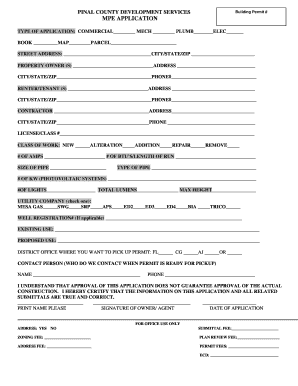
PINAL COUNTY DEVELOPMENT SERVICES Building Permit # MPE APPLICATION TYPE OF APPLICATION: COMMERCIAL MECH PLUMB ELEC BOOK MAP PARCEL STREET ADDRESS: CITY/STATE/ZIP PROPERTY OWNER (S) ADDRESS CITY/STATE/ZIP.

How it works

  1. Open form

    Open form follow the instructions

  2. Easily sign form

    Easily sign the form with your finger

  3. Share form

    Send filled & signed form or save

How to fill out the Mechanical, Plumbing, And Electrical Application - Pinal County - Pinalcountyaz online

Filling out the Mechanical, Plumbing, And Electrical Application is essential for obtaining the necessary permits for your construction or renovation project in Pinal County. This guide provides you with detailed instructions on each component of the application form, ensuring a smooth and efficient online submission process.

Follow the steps to successfully complete your application online.

  1. Press the ‘Get Form’ button to access the Mechanical, Plumbing, And Electrical Application form in the online editing interface.
  2. Begin by selecting the type of application you are submitting. Indicate whether it is for Commercial, Mechanical, Plumbing, or Electrical work.
  3. Provide the building permit number if applicable, then fill out the details regarding your property including the book, map, and parcel number.
  4. Enter the street address, including the city, state, and zip code of the property.
  5. Include information about the property owner, including their name, address, city, state, zip code, and phone number.
  6. If applicable, provide renter or tenant details, including name, address, city, state, zip code, and phone number.
  7. Fill out the contractor’s information, including name, address, city, state, zip code, and phone number.
  8. Enter the contractor's license and class number to validate their credentials.
  9. Select the class of work being performed such as new construction, alteration, addition, repair, or removal.
  10. Provide additional details including the number of amps, BTUs or length of run, and size of pipe you are using.
  11. Indicate the type of pipe being utilized in your project.
  12. For photovoltaic systems, specify the number of kilowatts.
  13. Enter the number of lights, total lumens, and maximum height of installations as applicable.
  14. Choose your utility company from the provided list.
  15. If applicable, include the well registration number.
  16. Detail the existing and proposed use of the property.
  17. Select the district office where you would like to pick up your permit.
  18. Designate a contact person for communication regarding the permit pickup, including their name and phone number.
  19. Acknowledge the statement regarding approval by signing the form and providing the date of application.
  20. Review all entered information for accuracy, then proceed to save changes, download, print, or share the completed form as needed.

Complete your Mechanical, Plumbing, And Electrical Application online for a quick and efficient permitting process.

Get form

Experience a faster way to fill out and sign forms on the web. Access the most extensive library of templates available.
Get form

Related content

Applications & Information Bulletins - Pinal...
010 - Does Pinal County have spa and swimming pool protective barrier requirements? PDF ·...
Learn more
Construction Trades - Mechanical Trades: Plumbing...
Additional related training will include basic electricity and troubleshooting ... IMC246...
Learn more
_M300_all Laser Platform M 300 M300 All...
ULS does not assume any liability arising out of the application or use of any products...
Learn more

Related links form

Church Forms And Documents Facta Alert Validation Form Garage/Yard Sale Permit - Eufaula, Alabama Ethio Physics Text Book Com

Questions & Answers

Get answers to your most pressing questions about US Legal Forms API.

Contact support

Loading. I want to put a storage shed on my property, do I need a permit? The county regulates the location of all storage sheds and, in some instances, also requires the approval of permits prior to establishment of a shed on a lot.

You can expect anywhere from 10 days to 2 weeks.

Residential Construction Permits require an average of 14 working days for approval or response. Additional approvals from other departments are also required to issue a permit. Commercial Construction Permits require an average of 28 working days for approval.

Documents submitted shall be reviewed for completeness prior to being accepted, this may take up to 7 business days.

BUILDING PERMIT FEES $575.75 for the first $50,000.00 plus $6.25 for each additional $1000.00 or fraction thereof, to and including $100,000.00.

BUILDING PERMIT FEES $575.75 for the first $50,000.00 plus $6.25 for each additional $1000.00 or fraction thereof, to and including $100,000.00.

Exemptions: A building permit is not required for one single story detached accessory building used as a tool or storage shed; playhouse and similar non-habitable use, provided the gross floor area does not exceed 200 square feet and wall height shall not exceed 10 feet above finish grade.

Get This Form Now!

Use professional pre-built templates to fill in and sign documents online faster. Get access to thousands of forms.
Get form
If you believe that this page should be taken down, please follow our DMCA take down processhere.
Get Mechanical, Plumbing, And Electrical Application - Pinal County - Pinalcountyaz
Get form
  • Adoption
  • Bankruptcy
  • Contractors
  • Divorce
  • Home Sales
  • Employment
  • Identity Theft
  • Incorporation
  • Landlord Tenant
  • Living Trust
  • Name Change
  • Personal Planning
  • Small Business
  • Wills & Estates
  • Packages A-Z
  • Affidavits
  • Bankruptcy
  • Bill of Sale
  • Corporate - LLC
  • Divorce
  • Employment
  • Identity Theft
  • Internet Technology
  • Landlord Tenant
  • Living Wills
  • Name Change
  • Power of Attorney
  • Real Estate
  • Small Estates
  • Wills
  • All Forms
  • Forms A-Z
  • Form Library
  • Legal Hub
  • About Us
  • Help Portal
  • Legal Resources
  • Blog
  • Affiliates
  • Contact Us
  • Delete My Account
  • Site Map
  • Industries
  • Forms in Spanish
  • Localized Forms
  • State-specific Forms
  • Forms Kit
  • Real Estate Handbook
  • All Guides
  • Notarize
  • Incorporation services
  • For Consumers
  • For Small Business
  • For Attorneys
  • USLegal
  • FormsPass
  • pdfFiller
  • signNow
  • altaFlow
  • DocHub
  • Instapage
Form Packages
  • Adoption
  • Bankruptcy
  • Contractors
  • Divorce
  • Home Sales
  • Employment
  • Identity Theft
  • Incorporation
  • Landlord Tenant
  • Living Trust
  • Name Change
  • Personal Planning
  • Small Business
  • Wills & Estates
  • Packages A-Z
Form Categories
  • Affidavits
  • Bankruptcy
  • Bill of Sale
  • Corporate - LLC
  • Divorce
  • Employment
  • Identity Theft
  • Internet Technology
  • Landlord Tenant
  • Living Wills
  • Name Change
  • Power of Attorney
  • Real Estate
  • Small Estates
  • Wills
  • All Forms
  • Forms A-Z
  • Form Library
Customer Service
  • Legal Hub
  • About Us
  • Help Portal
  • Legal Resources
  • Blog
  • Affiliates
  • Contact Us
  • Delete My Account
  • Site Map
  • Industries
  • Forms in Spanish
  • Localized Forms
  • State-specific Forms
  • Forms Kit
Legal Guides
  • Real Estate Handbook
  • All Guides
Prepared for you
  • Notarize
  • Incorporation services
Our Customers
  • For Consumers
  • For Small Business
  • For Attorneys
Our Sites
  • USLegal
  • FormsPass
  • pdfFiller
  • signNow
  • altaFlow
  • DocHub
  • Instapage
Social Media
Call us now toll free:
+1 833 426 79 33
As seen in:
© Copyright 1999-2026 airSlate Legal Forms, Inc. 3720 Flowood Dr, Flowood, Mississippi 39232
  • Your Privacy Choices
  • Terms of Service
  • Privacy Notice
  • Content Takedown Policy
  • Bug Bounty Program