Loading
Get Dhs 2841e
How it works
-

Open form follow the instructions
-

Easily sign the form with your finger
-

Send filled & signed form or save
How to fill out the Dhs 2841e online
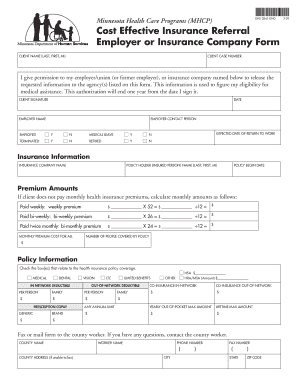
The Dhs 2841e form is essential for individuals applying for medical assistance through Minnesota Health Care Programs. This guide provides clear, step-by-step instructions to help you complete the form online effectively and efficiently.
Follow the steps to fill out the Dhs 2841e form online.
- Click ‘Get Form’ button to access the Dhs 2841e form and open it in your preferred online editor.
- Begin by entering the client name in the format of last name, first name, and middle initial in the designated CLIENT NAME field.
- Next, fill in the CLIENT CASE NUMBER accurately in the corresponding field to identify the individual case.
- Provide your permission by checking the relevant box and filling in the name of your employer/insurance company in the space provided.
- Sign and date the CLIENT SIGNATURE and DATE lines to authorize the release of your information.
- Input the EMPLOYER NAME and indicate your employment status by checking the appropriate boxes as either EMPLOYED, TERMINATED, or RETIRED.
- If applicable, provide the EXPECTED DATE OF RETURN TO WORK to indicate your work status.
- In the INSURANCE INFORMATION section, enter the INSURANCE COMPANY NAME and POLICY HOLDER NAME as requested.
- Fill in the POLICY BEGIN DATE to provide context regarding your insurance coverage.
- Calculate monthly premium amounts for health insurance if you do not pay monthly premiums, using the respective formulas for weekly, bi-weekly, and bi-monthly payments.
- Document the MONTHLY PREMIUM COST FOR ALL and the NUMBER OF PEOPLE COVERED BY POLICY in their respective fields.
- Check the boxes related to your health insurance policy coverage, including medical, dental, vision, and more.
- Complete the remaining sections on co-insurance, annual limits, and deductibles as applicable to your policy.
- Provide any additional information regarding prescription copay and related benefits.
- Finally, fax or mail the completed form to your county worker. Ensure you fill in the county name, worker name, phone number, and address if you are unable to fax.
- Once completed, ensure all information is accurate before saving changes, downloading, printing, or sharing the form.
Complete your Dhs 2841e form online today to ensure a smooth application process.