Loading
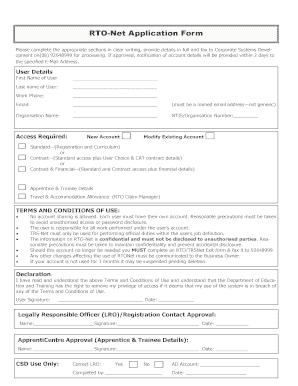
Get Rtonet
How it works
-

Open form follow the instructions
-

Easily sign the form with your finger
-

Send filled & signed form or save
How to fill out the Rtonet online
The Rtonet application form is essential for users seeking access to various systems within the organization. This guide offers a step-by-step approach to filling out the form accurately and effectively, ensuring that all required fields are addressed.
Follow the steps to complete the Rtonet application form online.
- Press the ‘Get Form’ button to obtain the Rtonet application and open the document in your preferred editing tool.
- In the 'User Details' section, carefully enter your first name, last name, work phone number, and email address. Be sure to use a specific email address, avoiding generic options.
- Next, fill in the 'Organisation Name' and the 'NTIS/Organisation Number' to associate your application with your organization.
- Select the type of access you require by indicating whether you need a 'New Account', 'Modify Existing Account', or one of the contract options provided.
- If applicable, provide details related to 'Apprentice & Trainee Details' and any travel or accommodation allowances required.
- Review the 'Terms and Conditions of Use'. Confirm your understanding by writing your signature and date in the designated areas.
- Obtain the necessary approvals by having the Legally Responsible Officer (LRO) and an ApprentiCentre representative sign and date their areas.
- After ensuring that all sections are completed, you can save your changes, download the form for your records, print it if needed, or share it with the appropriate department via fax.
Complete your documents online today to ensure timely processing.
For US dollars, the symbol '$' is sufficient abbreviation, unless there is a mixture of dollar currencies in the text. For other dollar currencies, '$' should be prefixed with the country abbreviation. For all other currencies, write the figure first followed by the currency name, for example, '100 million yuan'.
Industry-leading security and compliance
US Legal Forms protects your data by complying with industry-specific security standards.
-
In businnes since 199725+ years providing professional legal documents.
-
Accredited businessGuarantees that a business meets BBB accreditation standards in the US and Canada.
-
Secured by BraintreeValidated Level 1 PCI DSS compliant payment gateway that accepts most major credit and debit card brands from across the globe.