Loading
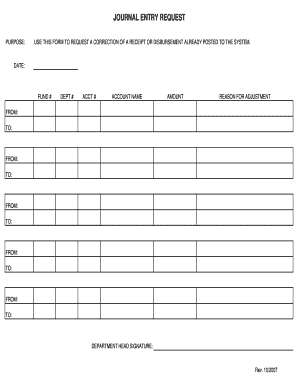
Get Journal Entry Request Form - Co Platte Mo
How it works
-

Open form follow the instructions
-

Easily sign the form with your finger
-

Send filled & signed form or save
How to fill out the Journal Entry Request Form - Co Platte Mo online
The Journal Entry Request Form - Co Platte Mo is designed to facilitate the correction of receipts or disbursements that have already been recorded in the system. This guide will provide you with detailed, step-by-step instructions on how to accurately complete the form online.
Follow the steps to successfully complete the Journal Entry Request Form.
- Click 'Get Form' button to obtain the form and open it in your editor.
- Fill in the date field with the current date to indicate when the request is being made.
- Enter the fund number associated with the transaction. This is essential for proper identification of the funds affected.
- Provide the department number that corresponds to the request. This helps categorize which department the correction applies to.
- Fill in the account number related to the receipt or disbursement being corrected. This is crucial for tracking specific transactions.
- Input the account name related to the financial transaction in question to ensure clarity about what is being referenced.
- Enter the amount that requires adjustment. Be precise, as this is a critical piece of information for processing the request.
- Provide a clear reason for the adjustment. This explanation serves to justify why the correction is needed.
- Fill out the multiple 'From' and 'To' fields as necessary to specify the range of transactions involved in the adjustment.
- Obtain the department head's signature in the designated area to finalize and authenticate the request.
- Once all sections are completed, save your changes, download, print, or share the form as needed.
Complete your Journal Entry Request Form online to ensure your corrections are processed efficiently.