Loading
Get Nys Ac 3243 S Rev 712 Form
How it works
-

Open form follow the instructions
-

Easily sign the form with your finger
-

Send filled & signed form or save
How to fill out the Nys Ac 3243 S Rev 712 Form online
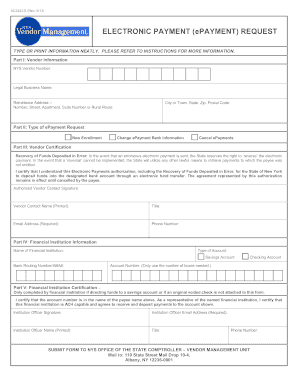
Completing the Nys Ac 3243 S Rev 712 Form online can streamline your electronic payment requests with the State of New York. This guide provides step-by-step instructions to help you navigate the form efficiently.
Follow the steps to fill out the Nys Ac 3243 S Rev 712 Form correctly.
- Click ‘Get Form’ button to obtain the form and open it in the editor.
- Part I: Vendor Information - Enter your NYS Vendor Number, Legal Business Name, and complete the Remittance Address, including the city or town, state, and ZIP code.
- Part II: Type of ePayment Request - Select one of the options: New Enrollment, Change ePayment Bank Information, or Cancel ePayments, as applicable.
- Part III: Vendor Certification - Provide your authorized vendor contact signature, name, title, email address, and phone number.
- Part IV: Financial Institution Information - Fill in the name of your financial institution, select the account type (savings or checking), and enter the bank routing number and your account number.
- Part V: Financial Institution Certification - If applicable, an institution officer must complete this section by signing the form and providing their name, title, email address, and phone number.
- After completing all sections, you can save your changes, download the form, print it, or share it as necessary.
Fill out your Nys Ac 3243 S Rev 712 Form online today to ensure the timely processing of your electronic payment requests.
Related links form
Life insurance Form 712 is an IRS document used to report the value of life insurance policies as part of estate tax filings. This form is vital for providing accurate information about life insurance proceeds and ensuring they are correctly handled within the estate. Utilizing the NYS AC 3243 S Rev 712 Form can facilitate this reporting process.