Get Coventry Prior Authorization Form
How it works
-

Open form follow the instructions
-

Easily sign the form with your finger
-

Send filled & signed form or save
How to fill out the Coventry Prior Authorization Form online
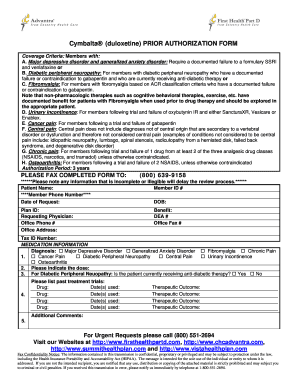
Filling out the Coventry Prior Authorization Form online is a streamlined process that enables users to efficiently obtain necessary authorizations for specific medications. This guide provides step-by-step instructions to help you complete the form accurately and ensure a smooth submission.
Follow the steps to effectively complete the form.
- Click ‘Get Form’ button to access the Coventry Prior Authorization Form and open it in your editor.
- Begin by entering the patient’s name in the designated field. Ensure that the name is spelled correctly to avoid any discrepancies.
- Input the patient's member ID number, then enter their phone number. Double-check to confirm the accuracy of this information.
- Fill in the date of request and the patient’s date of birth (DOB) to provide relevant demographic information.
- Complete the plan ID section to indicate the specific insurance plan associated with the patient.
- Enter the requesting physician's name, office phone number, and office address to identify who is submitting the request.
- Include the physician’s DEA number and office fax number; both are essential for processing the authorization.
- Provide the tax ID number related to the submitting physician's practice to verify their identity.
- Under medication information, select the appropriate diagnosis from the checkboxes provided, ensuring it corresponds with the patient's condition.
- Input the prescribed dosage of the medication in the section designated for dose information.
- For diabetic peripheral neuropathy, indicate whether the patient is currently receiving anti-diabetic therapy by selecting 'Yes' or 'No'.
- Document past treatment trials by listing the drugs used, their respective dates, and the therapeutic outcomes in the provided spaces.
- If any additional comments or information are necessary, use the additional comments section to elaborate before submitting.
- Once all fields are completed, review the form for accuracy, then save changes, and prepare to fax the form to (800) 639-9158.
Complete the Coventry Prior Authorization Form online to ensure a timely review of your request.
To submit a prior authorization to insurance, you will need to complete the Coventry Prior Authorization Form accurately. First, gather all necessary patient information and relevant medical details. Next, ensure that you include the specific services or medications requiring authorization. Finally, you can submit the completed form through your insurance provider's preferred method, which may include online submission, faxing, or mailing the document.