Loading
Form preview
  • US Legal Forms
  • Other Templates
  • More Forms
  • More Multi-State Forms
  • Consultation Form App For Spas 2020

Get Consultation Form App For Spas 2020-2026

How it works

  1. Open form

    Open form follow the instructions

  2. Easily sign form

    Easily sign the form with your finger

  3. Share form

    Send filled & signed form or save

How to fill out the Consultation Form App for Spas online

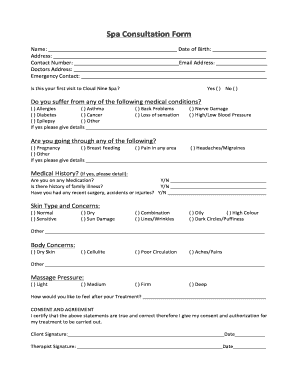
Navigating the Consultation Form for spas can be straightforward with the right guidance. This guide offers clear, step-by-step instructions to help users complete the form accurately and efficiently.

Follow the steps to complete your Consultation Form.

  1. To begin, click the ‘Get Form’ button to access the Consultation Form. Ensure you have a stable internet connection to avoid any interruptions while filling out the form.
  2. Start by entering your name in the designated field, followed by your date of birth. This personal information is crucial for identification.
  3. Next, provide your address, ensuring to include all necessary details for accurate communication.
  4. In the contact number field, enter a valid phone number where you can be reached. Additionally, fill in your email address to facilitate any necessary correspondence.
  5. Input your doctor's address, which may be required for health verification purposes.
  6. Identify an emergency contact by providing their name and contact information. This ensures safety during your spa visit.
  7. Indicate whether this is your first visit to the spa by selecting 'Yes' or 'No.' This information helps in tailoring your experience.
  8. Proceed to disclose any medical conditions by checking the relevant boxes. If applicable, provide additional details in the space provided.
  9. Address any current situations such as pregnancy or breastfeeding by marking the corresponding options.
  10. Share your medication status by responding 'Yes' or 'No.' If 'Yes,' provide details in the space available.
  11. Note any family history of illness, recent surgeries, or injuries by replying appropriately and offering additional details if necessary.
  12. Fill out your skin type and concerns by selecting the appropriate options. Be as thorough as possible to help your therapist assess your needs.
  13. Outline any body concerns you have by marking the relevant boxes, ensuring your therapist understands your expectations.
  14. Indicate your preferred massage pressure by choosing from light, medium, firm, or deep.
  15. Express how you would like to feel after your treatment in the provided space, helping to guide your therapist's approach.
  16. Finally, review all entries for accuracy. Once satisfied, provide your signature and the date to certify the authenticity of your statements.
  17. You can then save changes, download, print, or share the completed form as needed.

Complete your Consultation Form online today to ensure a tailored spa experience!

Get form

Experience a faster way to fill out and sign forms on the web. Access the most extensive library of templates available.
Get form

Related content

Skin Analysis Facial Consultation Form
Beyond the consultation form, many spas and clinics employ advanced tools like skin...
Learn more
Spa consultation form template
ClickUp's Spa Consultation Form Template simplifies the process of collecting vital health...
Learn more
Cisco ASR 1000 Series Embedded Services Processors...
The Cisco ASR 1000 Series Embedded Services Processors (ESPs) handle all the network...
Learn more

Related links form

Role Of Sebi In Monterey Stock Exchange Pdf Form Popcorn Prisms Anyone Ty Corp Td 460 Parts List Official Batting Order - ANCHOR TOWN SPORTS -

Questions & Answers

Get answers to your most pressing questions about US Legal Forms API.

Contact support

To create an intake form on Canva, start by picking a template that aligns with your spa's requirements. Add relevant questions to gather necessary information from clients, such as personal details and services requested. Using the Consultation Form App For Spas, you can manage and streamline the intake process, making it simple and efficient for both you and your clients.

Yes, Canva provides a variety of contract templates that can be used for different business needs. These templates allow you to customize contracts easily while maintaining a professional layout. The Consultation Form App For Spas complements this by ensuring all necessary client agreements are handled seamlessly.

To make a consultation form on Canva, choose from a variety of templates specifically designed for this purpose. Customize the form by adding your branding, questions, and any necessary fields. Utilize the benefits of a Consultation Form App For Spas to ensure your forms are not only functional but also engaging for your clients.

A beauty consultation form is a document designed to gather essential information from clients before their treatments. It typically includes questions about skin type, preferences, and medical history. Using a Consultation Form App For Spas ensures that these forms are easy to fill out, and allows you to organize client information efficiently.

To make a spa consultation card, begin by choosing a design tool like Canva. Select a template that reflects your spa's style and customize it with relevant questions or services. The Consultation Form App For Spas allows you to create beautiful consultation cards that enhance your client interactions and maintain a professional image.

Creating a questionnaire in Canva is straightforward. Start by selecting a template that suits your spa's branding or design. With the Consultation Form App For Spas, you can easily customize these templates to fit your specific needs, allowing you to gather relevant information from clients in a visually appealing format.

To print a consultation form on Therap, begin by accessing your account and navigating to the consultation forms section. Select the specific form you wish to print, and look for the print option within the interface. The Consultation Form App For Spas streamlines this process, making it easy to generate and print forms directly when you need them.

Filling out a client consultation form is essential for ensuring that all relevant information is captured before a treatment. It allows clients to express their needs clearly, which aids in customizing services effectively. By accurately documenting preferences and concerns, spa professionals can enhance the client experience, leading to better outcomes. A Consultation Form App For Spas can make this task easier and more efficient.

Client consultation and analysis are vital for delivering personalized spa experiences that resonate with individual clients. They allow professionals to address specific needs and adjust treatments accordingly. Moreover, thorough consultations help prevent potential issues, leading to improved client loyalty and satisfaction. A Consultation Form App For Spas can facilitate this process by providing structured templates for effective data collection.

A spa consultation is a process where a client discusses their goals, preferences, and any specific concerns with a spa professional. This interaction allows for a tailored service plan that aligns with the client's desires and expectations. It is an essential step toward achieving satisfying outcomes and encourages open communication. Employing a Consultation Form App For Spas can enhance this experience by ensuring all necessary details are captured.

Get This Form Now!

Use professional pre-built templates to fill in and sign documents online faster. Get access to thousands of forms.
Get form
If you believe that this page should be taken down, please follow our DMCA take down processhere.
Get Consultation Form App For Spas
Get form
  • Adoption
  • Bankruptcy
  • Contractors
  • Divorce
  • Home Sales
  • Employment
  • Identity Theft
  • Incorporation
  • Landlord Tenant
  • Living Trust
  • Name Change
  • Personal Planning
  • Small Business
  • Wills & Estates
  • Packages A-Z
  • Affidavits
  • Bankruptcy
  • Bill of Sale
  • Corporate - LLC
  • Divorce
  • Employment
  • Identity Theft
  • Internet Technology
  • Landlord Tenant
  • Living Wills
  • Name Change
  • Power of Attorney
  • Real Estate
  • Small Estates
  • Wills
  • All Forms
  • Forms A-Z
  • Other Templates
  • Legal Hub
  • About Us
  • Help Portal
  • Legal Resources
  • Blog
  • Affiliates
  • Contact Us
  • Delete My Account
  • Site Map
  • Industries
  • Forms in Spanish
  • Localized Forms
  • State-specific Forms
  • Forms Kit
  • Real Estate Handbook
  • All Guides
  • Notarize
  • Incorporation services
  • For Consumers
  • For Small Business
  • For Attorneys
  • USLegal
  • FormsPass
  • pdfFiller
  • signNow
  • altaFlow
  • DocHub
  • Instapage
Form Packages
  • Adoption
  • Bankruptcy
  • Contractors
  • Divorce
  • Home Sales
  • Employment
  • Identity Theft
  • Incorporation
  • Landlord Tenant
  • Living Trust
  • Name Change
  • Personal Planning
  • Small Business
  • Wills & Estates
  • Packages A-Z
Form Categories
  • Affidavits
  • Bankruptcy
  • Bill of Sale
  • Corporate - LLC
  • Divorce
  • Employment
  • Identity Theft
  • Internet Technology
  • Landlord Tenant
  • Living Wills
  • Name Change
  • Power of Attorney
  • Real Estate
  • Small Estates
  • Wills
  • All Forms
  • Forms A-Z
  • Other Templates
Customer Service
  • Legal Hub
  • About Us
  • Help Portal
  • Legal Resources
  • Blog
  • Affiliates
  • Contact Us
  • Delete My Account
  • Site Map
  • Industries
  • Forms in Spanish
  • Localized Forms
  • State-specific Forms
  • Forms Kit
Legal Guides
  • Real Estate Handbook
  • All Guides
Prepared for you
  • Notarize
  • Incorporation services
Our Customers
  • For Consumers
  • For Small Business
  • For Attorneys
Our Sites
  • USLegal
  • FormsPass
  • pdfFiller
  • signNow
  • altaFlow
  • DocHub
  • Instapage
Social Media
Call us now toll free:
+1 833 426 79 33
As seen in:
© Copyright 1999-2026 airSlate Legal Forms, Inc. 17 Station Street, Ste. 203, Brookline, MA 02445
  • Your Privacy Choices
  • Terms of Service
  • Privacy Notice
  • Content Takedown Policy
  • Bug Bounty Program