Get Army Review Board Agency Arba
How it works
-

Open form follow the instructions
-

Easily sign the form with your finger
-

Send filled & signed form or save
How to fill out the Army Review Board Agency Arba online
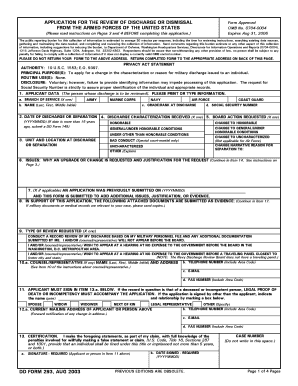
This guide is designed to assist users in accurately completing the Army Review Board Agency Arba form. By following these clear, step-by-step instructions, you can ensure that your application for the review of discharge or dismissal from the Armed Forces is submitted correctly.
Follow the steps to fill out the Army Review Board Agency Arba online effectively.
- Click ‘Get Form’ button to obtain the Army Review Board Agency Arba form and open it in your preferred editor.
- Carefully read the privacy act statement and the instructions on pages 3 and 4 before filling out the application to understand its purpose and requirements.
- In section 1, provide your personal information. This includes selecting your branch of service, entering your full name, grade or rank at discharge, and your social security number.
- In section 2, enter the date of your discharge or separation from service in YYYYMMDD format.
- In section 3, indicate the unit and location at which you were discharged or separated.
- In section 4, select the discharge characterization you received. These include options such as honorable, general, or under other than honorable conditions.
- In section 5, specify the board action requested. Indicate whether you want to change your discharge characterization or narrative reason.
- In section 6, clearly state the issues justifying the request for a discharge upgrade, focusing on specific incidents from your service.
- If applicable, in section 7, note if you have previously submitted an application and are adding issues or justification.
- In section 8, list any attached documents that will support your application and reference them appropriately.
- In section 9, choose the type of review you are requesting, either a records review or an in-person hearing.
- In section 10, provide the information of your counsel or representative, if you have one.
- In section 11, ensure that the applicant signs and dates the application in the required sections.
- In section 12, enter the current mailing address for future correspondence regarding the application.
- In the final section, review the entire application for accuracy, then save your changes, download, print, or share the completed form.
Start your application for the Army Review Board Agency Arba online today!
The Board for Correction of Military Records (BCMR) allows service members to request changes to their military records. The BCMR reviews cases based on the merits of each application, focusing on fairness and justice. If you seek to correct your military record, you can submit an application to the Army Review Board Agency (ARBA) for consideration. Utilizing US Legal Forms can simplify the application process, ensuring that you have the correct documentation.