We use cookies to improve security, personalize the user experience, enhance our marketing activities (including cooperating with our marketing partners) and for other business use.
Click "here" to read our Cookie Policy. By clicking "Accept" you agree to the use of cookies. Read less
Read more
Accept
Loading
Form preview
  • US Legal Forms
  • Form Library
  • More Forms
  • More Uncategorized Forms
  • My Sanc Reference Number

Get My Sanc Reference Number

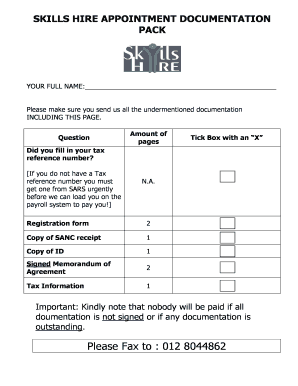
Able earnings will be added together at the end of the financial year when you do your tax return. This might put you in a higher income tax bracket resulting in you paying tax in! IF YOU ANSWER YES TO THE ABOVE QUESTION, 25% tax will be deducted from your income. BANK DETAILS: NAME OF BANK: BRANCH CODE BRANCH NAME (WHERE IS YOUR BRANCH)? (eg Silverton) ACCOUNT NR: TYPE OF AC.

How it works

  1. Open form

    Open form follow the instructions

  2. Easily sign form

    Easily sign the form with your finger

  3. Share form

    Send filled & signed form or save

How to fill out the My Sanc Reference Number online

This guide provides a step-by-step approach to filling out the My Sanc Reference Number form online. Designed to be clear and user-friendly, it aims to assist all users, regardless of their familiarity with legal documentation.

Follow the steps to complete the My Sanc Reference Number form effectively.

  1. Click ‘Get Form’ button to obtain the form and open it in the editor.
  2. Begin with filling in your full name at the top of the form. Ensure you provide your complete name as it appears on your identification documents.
  3. Next, confirm if you have filled in your tax reference number. If you do not have one, you will need to obtain it from the relevant tax authority before proceeding.
  4. Complete the registration form by filling in your surname, maiden name, first name, gender, ID number, passport number, and the number of children you have.
  5. Provide your physical and postal addresses, including postal codes, along with your contact numbers including home, work, and cell phone numbers.
  6. Indicate your professional designation by marking the applicable box as either a registered nurse, enrolled nurse, auxiliary nurse, or care worker.
  7. Fill in the details of your next of kin, including their surname, first name, relationship, and contact numbers.
  8. Input your bank details, including the name of the bank, branch code, branch name, account number, and type of account. Confirm if the account is in your name or someone else's.
  9. Add your tax information and indicate if you have other employment by marking the appropriate box.
  10. Once all sections are complete, review your information for accuracy. Then, sign and date the declaration at the end of the form.
  11. Finally, save your changes, and options will be available to download, print, or share the form as needed.

Complete your documentation online for a smooth process.

Get form

Experience a faster way to fill out and sign forms on the web. Access the most extensive library of templates available.
Get form

Related content

Perceptions of newly-qualified nurses performing...
Jul 8, 2015 — However, upon registration as a CNP, he/she is guided by the code of...
Learn more
marcel rwasabisi | University of the Western Cape...
... SANC as a Registered Professional Nurse with a reference number of 15847940. Currently...
Learn more
South African Broadcasting Corporation - Wikipedia
The South African Broadcasting Corporation (SABC) is the public broadcaster in South...
Learn more

Related links form

IL State Continuation Coverage Election Notice 2020 Aircraft Weight And Balance Form 2020 Sena Form 2020 Telehandler Checklist Download 2020

Questions & Answers

Get answers to your most pressing questions about US Legal Forms API.

Contact support

SANC registration is the official process that licenses nursing professionals in South Africa. It ensures that all practicing nurses and midwives meet the necessary qualifications and standards. To confirm your registration status or learn more, you can use your My Sanc Reference Number on the SANC website.

To verify your SANC registration, simply visit the SANC official website. Input your details, including your My Sanc Reference Number, to access your registration status. This confirmation is vital for your career and helps maintain the integrity of the nursing profession.

You can check if a nursing college is registered by visiting the SANC website and accessing their list of accredited institutions. This list provides essential information about each college, ensuring that you choose a reputable program. Using your My Sanc Reference Number may also help in retrieving specific details.

To check a nurse's registration, you need to visit the official SANC website. Enter the nurse's details, such as their name or My Sanc Reference Number, to verify their registration status. This ensures that the nurse is licensed and in good standing, which is crucial for patient safety.

You can contact the South African Nursing Council through their official website where you will find contact details for various departments. Additionally, having your My Sanc Reference Number handy can help expedite your inquiry, as it allows the council to assist you more efficiently. Consider reaching out via email or phone for specific queries to receive prompt support.

ERegister SANC is an online platform that allows you to manage your registration details conveniently. After logging in with your My Sanc Reference Number, you can update personal information, check your registration status, and access important resources. This service streamlines your interaction with SANC, making it easier and more efficient.

To change your personal details with SANC, log in to your account on the SANC website. You will need to provide your My Sanc Reference Number along with the updated information. Make sure to follow all instructions provided to ensure your details reflect correctly in the system.

To check if a midwife is registered, visit the official website of the South African Nursing Council. You can use the search function by entering the midwife's name or My Sanc Reference Number for a more precise result. This ensures that you are accessing accurate and up-to-date information about their registration status.

In ance with this policy, each health professional council accepts and processes applications relevant to its sector. SANC processes applications from foreign nurses and midwives who hold qualifications from a foreign country as well as South Africans who hold qualifications from a foreign country.

Find more information on the registration process on the Nursing Council website or contact them at 012 420 1000 or registrar@sanc.co.za .

Get This Form Now!

Use professional pre-built templates to fill in and sign documents online faster. Get access to thousands of forms.
Get form
If you believe that this page should be taken down, please follow our DMCA take down processhere.

Industry-leading security and compliance

US Legal Forms protects your data by complying with industry-specific security standards.
  • In businnes since 1997
    25+ years providing professional legal documents.
  • Accredited business
    Guarantees that a business meets BBB accreditation standards in the US and Canada.
  • Secured by Braintree
    Validated Level 1 PCI DSS compliant payment gateway that accepts most major credit and debit card brands from across the globe.
Get My Sanc Reference Number
Get form
Form Packages
Adoption
Bankruptcy
Contractors
Divorce
Home Sales
Employment
Identity Theft
Incorporation
Landlord Tenant
Living Trust
Name Change
Personal Planning
Small Business
Wills & Estates
Packages A-Z
Form Categories
Affidavits
Bankruptcy
Bill of Sale
Corporate - LLC
Divorce
Employment
Identity Theft
Internet Technology
Landlord Tenant
Living Wills
Name Change
Power of Attorney
Real Estate
Small Estates
Wills
All Forms
Forms A-Z
Form Library
Customer Service
Terms of Service
Privacy Notice
Legal Hub
Content Takedown Policy
Bug Bounty Program
About Us
Help Portal
Legal Resources
Blog
Affiliates
Contact Us
Delete My Account
Site Map
Industries
Forms in Spanish
Localized Forms
State-specific Forms
Forms Kit
Legal Guides
Real Estate Handbook
All Guides
Prepared for You
Notarize
Incorporation services
Our Customers
For Consumers
For Small Business
For Attorneys
Our Sites
US Legal Forms
USLegal
FormsPass
pdfFiller
signNow
airSlate WorkFlow
DocHub
Instapage
Social Media
Call us now toll free:
+1 833 426 79 33
As seen in:
  • USA Today logo picture
  • CBC News logo picture
  • LA Times logo picture
  • The Washington Post logo picture
  • AP logo picture
  • Forbes logo picture
© Copyright 1997-2025
airSlate Legal Forms, Inc.
3720 Flowood Dr, Flowood, Mississippi 39232
Form Packages
Adoption
Bankruptcy
Contractors
Divorce
Home Sales
Employment
Identity Theft
Incorporation
Landlord Tenant
Living Trust
Name Change
Personal Planning
Small Business
Wills & Estates
Packages A-Z
Form Categories
Affidavits
Bankruptcy
Bill of Sale
Corporate - LLC
Divorce
Employment
Identity Theft
Internet Technology
Landlord Tenant
Living Wills
Name Change
Power of Attorney
Real Estate
Small Estates
Wills
All Forms
Forms A-Z
Form Library
Customer Service
Terms of Service
Privacy Notice
Legal Hub
Content Takedown Policy
Bug Bounty Program
About Us
Help Portal
Legal Resources
Blog
Affiliates
Contact Us
Delete My Account
Site Map
Industries
Forms in Spanish
Localized Forms
State-specific Forms
Forms Kit
Legal Guides
Real Estate Handbook
All Guides
Prepared for You
Notarize
Incorporation services
Our Customers
For Consumers
For Small Business
For Attorneys
Our Sites
US Legal Forms
USLegal
FormsPass
pdfFiller
signNow
airSlate WorkFlow
DocHub
Instapage
Social Media
Call us now toll free:
+1 833 426 79 33
As seen in:
  • USA Today logo picture
  • CBC News logo picture
  • LA Times logo picture
  • The Washington Post logo picture
  • AP logo picture
  • Forbes logo picture
© Copyright 1997-2025
airSlate Legal Forms, Inc.
3720 Flowood Dr, Flowood, Mississippi 39232