Get 8821 - Tax Information Authorization - Affordable Payroll
How it works
-

Open form follow the instructions
-

Easily sign the form with your finger
-

Send filled & signed form or save
How to fill out the 8821 - Tax Information Authorization - Affordable Payroll online
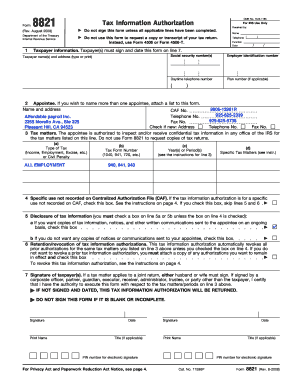
Filling out the 8821 form is essential for authorizing an individual or organization to access your confidential tax information. This guide provides a clear, step-by-step process to help you complete the 8821 - Tax Information Authorization - Affordable Payroll online, ensuring all necessary fields are accurately filled.
Follow the steps to complete the tax information authorization form online.
- Use the 'Get Form' button to access the 8821 form. This will open the form in a new editor for your convenience.
- Begin with line 1, which requires your taxpayer information. Enter your full name, address, and Social Security Number (SSN) or Employer Identification Number (EIN). If applicable, provide information for your spouse if you are filing jointly.
- In line 2, specify your appointee's information. Include their full name, address, and telephone number. If your appointee has a Centralized Authorization File (CAF) number, enter it. If not, write 'NONE' to allow the IRS to assign one.
- Proceed to line 3, which outlines the tax matters to which the authorization applies. Clearly indicate the type of tax, corresponding tax form numbers, and the relevant years or periods. Be specific and avoid general terms. Provide any additional specific tax matters in the final column.
- If the authorization is for a specific use not recorded on the CAF, check the corresponding box on line 4. This might be applicable for requests related to educational institutions or loan companies.
- Line 5 requires you to indicate whether you want copies of notices and communications sent to your appointee. Select the appropriate box according to your preference.
- Line 6 deals with the retention and revocation of prior tax information authorizations. If you wish to keep prior authorizations intact, attach any relevant documents and check the box accordingly.
- Complete line 7 by signing and dating the form. Ensure that all applicable taxpayers sign where required, providing clear names and any applicable titles for corporate representatives.
- After filling out the form, review all entries for accuracy. Save your changes and download a copy for your records. You can also print the form or share it as needed.
Complete your 8821 - Tax Information Authorization - Affordable Payroll online today to ensure proper access to your tax information.
You can get the 8821 - Tax Information Authorization - Affordable Payroll form directly from the IRS website, where it is available for download. Additionally, U.S. Legal Forms offers a comprehensive collection of legal forms, including the 8821, making it easy to find and fill out. By using their platform, you can ensure that you have the latest version and receive guidance throughout the process. This can save you time and reduce the risk of errors.