Get National Provider Identifier (npi) Application/update ...
How it works
-

Open form follow the instructions
-

Easily sign the form with your finger
-

Send filled & signed form or save
How to fill out the NATIONAL PROVIDER IDENTIFIER (NPI) APPLICATION/UPDATE online
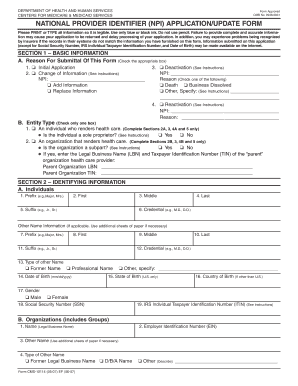
The National Provider Identifier (NPI) Application/Update form is essential for healthcare providers seeking to obtain or update their unique identifiers. This guide provides comprehensive and user-friendly instructions for filling out the NPI application online, ensuring accuracy and efficiency in the process.
Follow the steps to complete the NPI application online.
- Press the ‘Get Form’ button to access the NPI application/update form and launch it in the appropriate editor.
- Begin by filling out Section 1 – Basic Information. Indicate the reason for submitting the form by checking the appropriate box: Initial Application, Change of Information, Deactivation, or Reactivation. Select the entity type that applies to you, either an individual or an organization, and provide any relevant details as instructed.
- Complete Section 2 – Identifying Information. For individuals, provide your full legal name, date of birth, gender, and Social Security Number (SSN) if applicable. For organizations, list the legal business name and Employer Identification Number (EIN). If there are any other names used, include that information as well.
- In Section 3 – Business Addresses and Other Information, enter your business mailing address and primary practice location. Make sure to include the business telephone number and fax number (if applicable) for efficient communication.
- Section 4 requires you to complete the Certification Statement. Ensure you or an authorized official signs and dates the certification, confirming the accuracy of the provided information and understanding of the penalties for falsifying information.
- Finally, conclude with Section 5 – Contact Person. Provide the relevant details for a contact person who can be approached for queries regarding the application. Ensure that the contact information is up-to-date and accurate.
- After completing all sections, save your changes. You have the option to download, print, or share the NPI application/update form as needed.
Begin filling out the NPI application online today to secure your identifier!
The responsibility for updating National Provider Identifier (NPI) information falls on the healthcare provider or their authorized representatives. It is crucial for providers to keep their NPI data current to maintain compliance with regulations and ensure proper billing. Regularly reviewing your NPI information helps avoid issues with insurance claims and patient care. If you need assistance, uslegalforms provides tools to help manage your NPI updates efficiently.