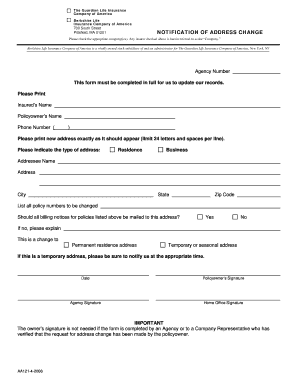
Get Change Of Address Form - Guardian Disability Insurance Brokerage
How it works
-

Open form follow the instructions
-

Easily sign the form with your finger
-

Send filled & signed form or save
How to fill out the Change Of Address Form - Guardian Disability Insurance Brokerage online
Completing the Change Of Address Form for Guardian Disability Insurance Brokerage online is a simple process that allows you to update your contact information efficiently. This guide will walk you through each section of the form to ensure your information is accurately submitted.
Follow the steps to complete your online form submission.
- Click ‘Get Form’ button to obtain the form and open it in the editor.
- Begin by checking the appropriate company or companies that the address change applies to. This ensures that the correct records are updated.
- Enter the Agency Number. This helps the insurance company to identify your specific account.
- Fill in the insured's name as it appears on the policy, followed by the policyowner’s name. This information must be accurate for identification purposes.
- Provide your phone number in the designated field. This is important for any follow-up communication regarding your address change.
- Print your new address in the space provided, ensuring that it is formatted clearly with a limit of 24 characters per line.
- Indicate the type of address by selecting either 'Residence' or 'Business.' This clarifies the purpose of the location.
- List the Addressee's Name, City, State, and Zip Code where the new address should be directed.
- Detail all policy numbers that need to have their address changed in the provided section to ensure all relevant records are updated.
- Select 'Yes' or 'No' regarding whether all billing notices for the listed policies should be sent to the new address. If 'No,' provide a brief explanation in the space allotted.
- Specify whether this change is for a permanent or temporary address by choosing the appropriate option. If it’s temporary, be sure to note the importance of notifying them again when the address changes back.
- Sign and date the form in the relevant sections. Note that the owner’s signature is not required if an Agency or Company Representative has verified the request.
- Once you have completed the form, you can save the changes, and choose to download, print, or share the filled-out document as needed.
Get started on your form now to ensure your address is updated promptly.
Related links form
You can contact Guardian insurance through their customer service hotline or by visiting their website for additional options. They offer a range of contact methods, including email and live chat, making it convenient to get assistance. If you need to change your address, having the Change Of Address Form - Guardian Disability Insurance Brokerage handy will streamline your communication process. Their team is ready to help you with any questions or concerns you may have.
Industry-leading security and compliance
-
In businnes since 199725+ years providing professional legal documents.
-
Accredited businessGuarantees that a business meets BBB accreditation standards in the US and Canada.
-
Secured by BraintreeValidated Level 1 PCI DSS compliant payment gateway that accepts most major credit and debit card brands from across the globe.