Loading
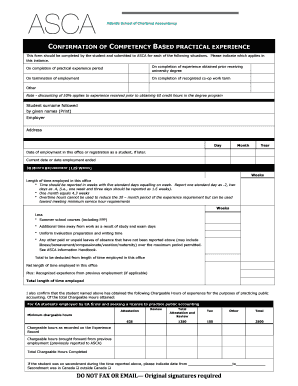
Get Confirmation Of Competency Based Practical Experience Form
How it works
-

Open form follow the instructions
-

Easily sign the form with your finger
-

Send filled & signed form or save
How to fill out the Confirmation Of Competency Based Practical Experience Form online
The Confirmation Of Competency Based Practical Experience Form is an essential document for students completing their practical experience requirements in accounting. This guide provides you with a straightforward approach to effectively filling out the form online, ensuring that all necessary components are accurately completed.
Follow the steps to successfully complete the form.
- Click ‘Get Form’ button to obtain the form and open it in the editor.
- Begin by selecting the applicable situation from the options provided: completion of practical experience period, experience obtained prior to receiving a university degree, termination of employment, completion of a recognized co-op work term, or other. Make sure to thoroughly understand which option applies to your circumstances.
- Enter your surname followed by your given names in the designated field. Ensure that this section is clear and legible to avoid any issues with identification.
- Fill in your employer's name and address accurately. This information is crucial for verification purposes.
- Record the dates relevant to your experience, including the start date of employment in the office and the current date or the date of employment termination. Use the format of day, month, and year.
- Document the length of time you were employed in this office, converting your working days into weeks accordingly. Remember that five standard days equal one week, and report fractions of weeks accurately.
- Deduct any applicable weeks from your total length of employment, such as those spent in summer school courses, study days, or other forms of absence, as outlined. Be precise in this calculation for accuracy.
- Calculate your net length of time employed by incorporating any recognized experience from previous employment, if applicable, and document the total length of time employed.
- Indicate the number of chargeable hours obtained during your practical experience. Fill in the breakdown of hours for attestation, review, tax, and other fields as required. Ensure that each category reflects your experience accurately.
- If you were on secondment, specify the relevant dates and whether it took place within Canada or outside of Canada.
- Obtain the necessary signature from your training principal, ensuring they confirm your time in the training program and your progress towards meeting competency expectations.
- Complete the statement section where you confirm your moral character and readiness for membership based on the completion of your practical experience requirements.
- Ensure all signatures are original, as faxed or emailed submissions are not accepted. Save changes, download, print, or share the completed form as necessary.
Complete your documents online to ensure a smooth submission process.
Related links form
How to do a competency-based assessment Define the competencias you want to assess. ... Determine the employee's expected competency level. ... Observe the employee and request feedback. ... Develop an action plan. ... Communicate the result.
Industry-leading security and compliance
US Legal Forms protects your data by complying with industry-specific security standards.
-
In businnes since 199725+ years providing professional legal documents.
-
Accredited businessGuarantees that a business meets BBB accreditation standards in the US and Canada.
-
Secured by BraintreeValidated Level 1 PCI DSS compliant payment gateway that accepts most major credit and debit card brands from across the globe.