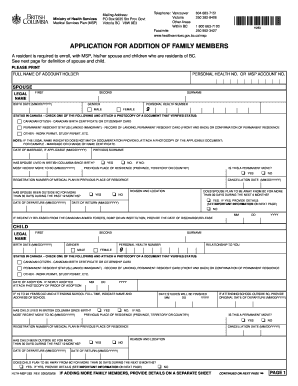
Get 263 App For Addition Of Family - Ministry Of Health - Health Gov Bc
How it works
-

Open form follow the instructions
-

Easily sign the form with your finger
-

Send filled & signed form or save
How to fill out the 263 App For Addition Of Family - Ministry Of Health - Health Gov Bc online
Filling out the 263 Application for Addition of Family members is an important step for residents of British Columbia to ensure their family members are covered under the Medical Services Plan (MSP). This guide provides comprehensive instructions on how to complete the form efficiently and accurately.
Follow the steps to complete the form online seamlessly.
- Click ‘Get Form’ button to obtain the 263 Application for Addition of Family form and open it in the appropriate editor.
- Begin by entering the full name of the account holder as it appears on their identification documents.
- Provide the personal health number or MSP account number of the account holder. This information is crucial for proper identification.
- Fill in the spouse's legal name, including first name, second name, surname, and birth date. Indicate the spouse's gender by checking the appropriate box.
- Select the status in Canada for the spouse. Attach a photocopy of the relevant documentation that verifies their status, such as a citizenship card or permanent resident card.
- If applicable, include the date of marriage and any previous surnames for the spouse.
- Continue by answering whether the spouse has lived in British Columbia since birth. If not, provide details of their most recent move to BC along with previous place of residence.
- Indicate if this is a permanent move and provide the registration number of the medical plan in the previous place of residence, if applicable.
- Answer the question regarding whether the spouse has been outside BC for more than 30 days in the past 12 months. Include the date of departure and reason for being outside BC.
- For the child section, provide the child's legal name, birth date, and gender. Indicate the relationship to the account holder.
- Fill in the child's status in Canada and attach supporting documents as needed. If the child is 19 to 24 years old and attending school, include the name and address of the school.
- Answer questions about the child's residency in BC, any moves to BC, and any absences from the province in the past year.
- If adding more family members, use a separate sheet to provide their details.
- Review all the information for accuracy, sign the application, and make sure to include the date of the signature.
- Lastly, provide any necessary contact information and residential addresses, then save changes, download, print, or share the completed form as needed.
Complete your 263 Application for Addition of Family members online today to ensure timely access to healthcare benefits.
To add a family member to your MSP account, collect their personal information, such as their full name and date of birth. You can access the required forms through the MSP website or by contacting their customer service. After submitting the forms, monitor your account for updates on the addition. The 263 App For Addition Of Family - Ministry Of Health - Health Gov Bc can greatly facilitate this process, ensuring a smoother experience.
Industry-leading security and compliance
-
In businnes since 199725+ years providing professional legal documents.
-
Accredited businessGuarantees that a business meets BBB accreditation standards in the US and Canada.
-
Secured by BraintreeValidated Level 1 PCI DSS compliant payment gateway that accepts most major credit and debit card brands from across the globe.