We use cookies to improve security, personalize the user experience, enhance our marketing activities (including cooperating with our marketing partners) and for other business use.
Click "here" to read our Cookie Policy. By clicking "Accept" you agree to the use of cookies. Read less
Read more
Accept
Loading
Form preview
  • US Legal Forms
  • Form Library
  • Other Forms
  • Florida Other Forms
  • Fl Ben-001 2016

Get Fl Ben-001 2016-2025

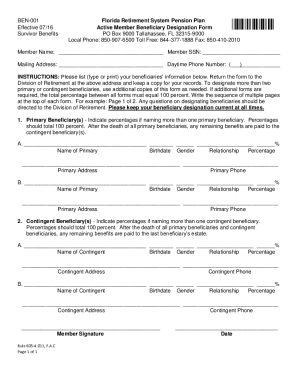
377-1888 Fax: 850-410-2010 This form is for currently employed members or terminated members (not retired) who wish to designate or change their beneficiaries. This form is also available from the Forms section of the Members page of the division’s website, www.FRS.MyFlorida.com. Your beneficiary designation can also be securely updated by logging in to your FRS Online account. FRS MEMBERS: Only a beneficiary who qualifies as a joint annuitant will be eligible for a monthly benefit upon your .

How it works

  1. Open form

    Open form follow the instructions

  2. Easily sign form

    Easily sign the form with your finger

  3. Share form

    Send filled & signed form or save

How to fill out the FL BEN-001 online

Filling out the FL BEN-001 form is essential for members of the Florida Retirement System who wish to designate or change their beneficiaries. This guide provides clear and detailed instructions to help you navigate the process effectively.

Follow the steps to complete the FL BEN-001 form.

  1. Press the ‘Get Form’ button to access the FL BEN-001 form and open it for editing.
  2. Begin filling out your member information, including your name, social security number, and mailing address. Ensure that all details are accurate and up-to-date.
  3. Provide your daytime phone number to facilitate any necessary communications regarding your application.
  4. Designate your primary beneficiaries. For each primary beneficiary, fill in their name, birthdate, gender, relationship to you, and the percentage of benefits they are to receive. Remember that the total percentage must equal 100 percent.
  5. If you have more than two primary beneficiaries, use additional copies of the form, ensuring to label each page sequentially (e.g., Page 1 of 2).
  6. Next, indicate your contingent beneficiaries in a similar manner as the primary beneficiaries. Again, provide their name, birthdate, gender, relationship, and percentage distribution of benefits.
  7. Sign and date the form to validate your beneficiary designation.
  8. Once completed, save the changes, download the form for your records, print it, or share it as needed. Ensure you return the original signed form to the Division of Retirement.

Complete your FL BEN-001 form online for a seamless beneficiary designation process.

Get form

Experience a faster way to fill out and sign forms on the web. Access the most extensive library of templates available.
Get form

Related content

Florida Retirement System Pension Plan Active...
Page 1. Florida Retirement System Pension Plan. Active Member Beneficiary Designation...
Learn more
BEN-001 Florida Retirement System Pension Plan Rev...
FRS MEMBERS: Only a beneficiary who qualifies as a joint annuitant will be eligible for a...
Learn more
CVP-809 CVP-805 Owner's Manual
Agradecemos a compra deste Yamaha Digital Piano! Este instrumento oferece um conjunto...
Learn more

Related links form

Pdf Nims Forms Hazardous Stump Worksheet - Fema Fema Cost Estimating Format Fire Data Analysis Handbook

Questions & Answers

Get answers to your most pressing questions about US Legal Forms API.

Contact support

When indicating the beneficiary percentage on the FL BEN-001 form, you should allocate the total shares among your beneficiaries without exceeding 100%. If you have multiple beneficiaries, consider how you want to divide your assets fairly. For example, you might assign 50% to one beneficiary and divide the remaining 50% between others. Clearly stating these percentages ensures your wishes are honored.

Filling out a beneficiary designation form is straightforward, particularly with the FL BEN-001 template available on UsLegalForms. Begin by entering your personal information at the top of the form. Then, list each beneficiary's name, relationship, and their percentage of ownership. Finally, make sure to sign and date the form, confirming that you understand and agree with the designations made.

A designated beneficiary is someone you choose to receive benefits from your accounts when you pass away. For example, you might name a family member, such as a spouse or child, as your designated beneficiary on a life insurance policy or a retirement account. This ensures that your assets are transferred quickly and according to your intentions. Using the FL BEN-001 form, you can clearly specify who your designated beneficiaries are.

To fill out a beneficiary designation, start by accessing the FL BEN-001 form, which you can easily find on the UsLegalForms platform. Ensure you have all necessary personal information ready, including your details and the recipient’s information. Carefully input the required information, making sure to double-check for accuracy. Once completed, review the form before submitting it to ensure it reflects your wishes.

The DROP program in Florida has its disadvantages, which include the potential loss of health benefits if you leave employment before retirement. Additionally, participating in DROP may limit your ability to access certain pension benefits. It’s crucial to weigh these factors carefully, especially when using tools like the FL BEN-001 form, which helps you understand the implications of your decisions regarding retirement.

To fill out beneficiary details, start by providing the beneficiary's full name, relationship to you, and date of birth. It is essential to ensure accuracy here to avoid complications later. If you find it challenging, using the FL BEN-001 template from US Legal Forms can simplify this task. Always review the details with the beneficiaries to confirm everything is correct before submitting.

In Florida, you can enter the Deferred Retirement Option Program (DROP) at age 62 or after completing 30 years of service, whichever comes first. It's a great way to enhance your retirement savings while still working. Consider consulting the FL BEN-001 resources to understand how DROP can work for your situation. This option allows you to plan effectively for your retirement.

Filling out a primary beneficiary form is straightforward. Start by providing your personal information, including full name and address. Next, list the beneficiaries, ensuring you include their relationship to you and obtain their consent. Once completed, review the form carefully and submit it according to the guidelines provided, such as using the FL BEN-001 form from US Legal Forms for best practices.

Get This Form Now!

Use professional pre-built templates to fill in and sign documents online faster. Get access to thousands of forms.
Get form
If you believe that this page should be taken down, please follow our DMCA take down processhere.

Industry-leading security and compliance

US Legal Forms protects your data by complying with industry-specific security standards.
  • In businnes since 1997
    25+ years providing professional legal documents.
  • Accredited business
    Guarantees that a business meets BBB accreditation standards in the US and Canada.
  • Secured by Braintree
    Validated Level 1 PCI DSS compliant payment gateway that accepts most major credit and debit card brands from across the globe.
Get FL BEN-001
Get form
Form Packages
Adoption
Bankruptcy
Contractors
Divorce
Home Sales
Employment
Identity Theft
Incorporation
Landlord Tenant
Living Trust
Name Change
Personal Planning
Small Business
Wills & Estates
Packages A-Z
Form Categories
Affidavits
Bankruptcy
Bill of Sale
Corporate - LLC
Divorce
Employment
Identity Theft
Internet Technology
Landlord Tenant
Living Wills
Name Change
Power of Attorney
Real Estate
Small Estates
Wills
All Forms
Forms A-Z
Form Library
Customer Service
Terms of Service
Privacy Notice
Legal Hub
Content Takedown Policy
Bug Bounty Program
About Us
Help Portal
Legal Resources
Blog
Affiliates
Contact Us
Delete My Account
Site Map
Industries
Forms in Spanish
Localized Forms
State-specific Forms
Forms Kit
Legal Guides
Real Estate Handbook
All Guides
Prepared for You
Notarize
Incorporation services
Our Customers
For Consumers
For Small Business
For Attorneys
Our Sites
US Legal Forms
USLegal
FormsPass
pdfFiller
signNow
airSlate WorkFlow
DocHub
Instapage
Social Media
Call us now toll free:
+1 833 426 79 33
As seen in:
  • USA Today logo picture
  • CBC News logo picture
  • LA Times logo picture
  • The Washington Post logo picture
  • AP logo picture
  • Forbes logo picture
© Copyright 1997-2025
airSlate Legal Forms, Inc.
3720 Flowood Dr, Flowood, Mississippi 39232
Form Packages
Adoption
Bankruptcy
Contractors
Divorce
Home Sales
Employment
Identity Theft
Incorporation
Landlord Tenant
Living Trust
Name Change
Personal Planning
Small Business
Wills & Estates
Packages A-Z
Form Categories
Affidavits
Bankruptcy
Bill of Sale
Corporate - LLC
Divorce
Employment
Identity Theft
Internet Technology
Landlord Tenant
Living Wills
Name Change
Power of Attorney
Real Estate
Small Estates
Wills
All Forms
Forms A-Z
Form Library
Customer Service
Terms of Service
Privacy Notice
Legal Hub
Content Takedown Policy
Bug Bounty Program
About Us
Help Portal
Legal Resources
Blog
Affiliates
Contact Us
Delete My Account
Site Map
Industries
Forms in Spanish
Localized Forms
State-specific Forms
Forms Kit
Legal Guides
Real Estate Handbook
All Guides
Prepared for You
Notarize
Incorporation services
Our Customers
For Consumers
For Small Business
For Attorneys
Our Sites
US Legal Forms
USLegal
FormsPass
pdfFiller
signNow
airSlate WorkFlow
DocHub
Instapage
Social Media
Call us now toll free:
+1 833 426 79 33
As seen in:
  • USA Today logo picture
  • CBC News logo picture
  • LA Times logo picture
  • The Washington Post logo picture
  • AP logo picture
  • Forbes logo picture
© Copyright 1997-2025
airSlate Legal Forms, Inc.
3720 Flowood Dr, Flowood, Mississippi 39232