Loading
Form preview
  • US Legal Forms
  • Form Library
  • More Forms
  • More Uncategorized Forms
  • Close Kiwibank Account

Get Close Kiwibank Account

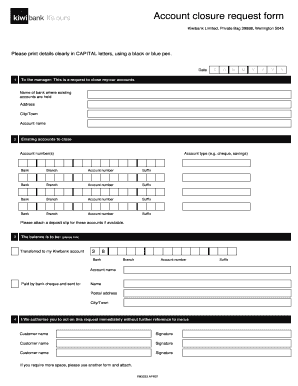
Y bank cheque and sent to: Name Postal address City/Town 4 I/We authorise you to act on this request immediately without further reference to me/us Customer name Signature Customer name Signature Customer name Signature If you require more space, please use another form and attach. FM3233 APR07 Suffix Y Y Y Y FM3233 APR07.

How it works

  1. Open form

    Open form follow the instructions

  2. Easily sign form

    Easily sign the form with your finger

  3. Share form

    Send filled & signed form or save

How to fill out the Close Kiwibank Account online

Closing a Kiwibank account online is a straightforward process that requires careful attention to detail. This guide provides clear steps to complete the Close Kiwibank Account form accurately and efficiently, ensuring your account closure is handled smoothly.

Follow the steps to complete the account closure request form.

  1. Click the ‘Get Form’ button to obtain the account closure request form and open it in your chosen platform.
  2. Fill in the date in the specified format (DD/MM).
  3. Address the form to the manager by clearly indicating the intention to close your account(s) at Kiwibank.
  4. Enter the name of the bank where your existing accounts are held, along with the address and city/town.
  5. List the existing accounts you wish to close by entering the account number(s), account type (e.g., cheque, savings), and associated bank and branch details for each account.
  6. Attach a deposit slip for the accounts if available, as requested in the form.
  7. Indicate how you would like the balance of your accounts to be handled by ticking the appropriate box, either transferring to a Kiwibank account or requesting a bank cheque.
  8. Provide the necessary details if choosing to have the balance paid by bank cheque, including your name, postal address, and city/town.
  9. Authorize the request by signing with your name in the designated signature section. If multiple signatures are required, ensure they are all included.
  10. If additional space is necessary to include more accounts or information, attach another form as needed.
  11. Once all fields are accurately completed, save the changes. You may download, print, or share the completed form as required.

Complete your account closure request online today to ensure a smooth transition.

Get form

Experience a faster way to fill out and sign forms on the web. Access the most extensive library of templates available.
Get form

Related content

Can I stop payment on a preauthorized...
Opening, Closing & Inactive Bank Accounts · Required Identification ... If you authorized...
Learn more
Forums - Post View | Discussion | PSYBNS Club |...
When you have an account, then it is possible to activate these services. ... of...
Learn more
New Zealand English - zxc.wiki
Due to the close ties between New Zealand and Australia and the ... for example a bank...
Learn more

Related links form

Cincinnati Bell Landlord Permission Form CJM 186253 Coldwell Banker-Mabery Property Management Residential Rental Application 2009 Colony Club Partial Furnished Apartment Addendum

Questions & Answers

Get answers to your most pressing questions about US Legal Forms API.

Contact support

To permanently close your bank account, first ensure that all transactions are complete and your account balance is zero. After that, contact your bank to request that they close your account. Follow any specific instructions they provide to finalize the closure. For additional resources and assistance, you can explore the tools available at uslegalforms to make this process smoother.

To close your account with Kiwibank, begin by reviewing any pending transactions and withdrawing your remaining funds. Then, you can either log into your online banking account or visit a local branch to request the closure. It’s important to ensure all automatic payments are canceled. If you need help, uslegalforms can guide you through the necessary steps.

Closing a bank account typically does not directly affect your credit score. However, if the account has a negative balance or if you fail to settle any outstanding payments, it could impact your credit. It's important to ensure that your account is in good standing before you close it. For more assistance, consider using uslegalforms to understand the implications better.

To completely close a bank account, start by ensuring that all transactions are settled. Withdraw your remaining balance and cancel any automatic payments or direct deposits linked to the account. Finally, contact your bank, either online or in person, and request the closure. If you need guidance, uslegalforms can provide resources to help you through the process.

To contact Kiwibank from overseas, you can call their international customer service number or use their online chat support. Be sure to have your account details ready for verification. Additionally, you can email them for assistance. If you need help navigating this process, uslegalforms provides resources to guide you in contacting banks effectively.

You can close your bank account online if your bank supports this feature. Typically, you will need to log into your online banking portal and locate the section for account management. Follow the instructions carefully to ensure a smooth closure process. If you prefer additional assistance, uslegalforms can help you understand the requirements for closing your account.

It is indeed possible to close your bank account online, depending on your bank's policies. Most banks offer online account closure options, which allow you to complete the process from the comfort of your home. Ensure that you have cleared any pending transactions and have followed the necessary steps provided by your bank. If you encounter any difficulties, consider using platforms like uslegalforms for guidance.

Yes, you can close your Kiwibank account online through their official website. To do this, log in to your online banking account, navigate to the account settings, and follow the prompts for account closure. Make sure to settle any outstanding transactions before initiating the process. This option provides a convenient way to manage your banking needs without visiting a branch.

Physically go to the bank branch in-person to close the account. Pay an account closure fee to close the account. Provide authenticated copies of your ID and mail them in by registered mail. Provide your tax ID number to the bank to close the account and release funds.

Some banks may let you close your account online with options such as a live chat with customer service. But if closing your account online isn't an option at your bank, you may be able to do it over the phone, by mail or fax or in person.

Get This Form Now!

Use professional pre-built templates to fill in and sign documents online faster. Get access to thousands of forms.
Get form
If you believe that this page should be taken down, please follow our DMCA take down processhere.

Industry-leading security and compliance

US Legal Forms protects your data by complying with industry-specific security standards.
  • In businnes since 1997
    25+ years providing professional legal documents.
  • Accredited business
    Guarantees that a business meets BBB accreditation standards in the US and Canada.
  • Secured by Braintree
    Validated Level 1 PCI DSS compliant payment gateway that accepts most major credit and debit card brands from across the globe.
Get Close Kiwibank Account
Get form
  • Adoption
  • Bankruptcy
  • Contractors
  • Divorce
  • Home Sales
  • Employment
  • Identity Theft
  • Incorporation
  • Landlord Tenant
  • Living Trust
  • Name Change
  • Personal Planning
  • Small Business
  • Wills & Estates
  • Packages A-Z
  • Affidavits
  • Bankruptcy
  • Bill of Sale
  • Corporate - LLC
  • Divorce
  • Employment
  • Identity Theft
  • Internet Technology
  • Landlord Tenant
  • Living Wills
  • Name Change
  • Power of Attorney
  • Real Estate
  • Small Estates
  • Wills
  • All Forms
  • Forms A-Z
  • Form Library
  • Legal Hub
  • About Us
  • Help Portal
  • Legal Resources
  • Blog
  • Affiliates
  • Contact Us
  • Delete My Account
  • Site Map
  • Industries
  • Forms in Spanish
  • Localized Forms
  • State-specific Forms
  • Forms Kit
  • Real Estate Handbook
  • All Guides
  • Notarize
  • Incorporation services
  • For Consumers
  • For Small Business
  • For Attorneys
  • USLegal
  • FormsPass
  • pdfFiller
  • signNow
  • altaFlow
  • DocHub
  • Instapage
Form Packages
  • Adoption
  • Bankruptcy
  • Contractors
  • Divorce
  • Home Sales
  • Employment
  • Identity Theft
  • Incorporation
  • Landlord Tenant
  • Living Trust
  • Name Change
  • Personal Planning
  • Small Business
  • Wills & Estates
  • Packages A-Z
Form Categories
  • Affidavits
  • Bankruptcy
  • Bill of Sale
  • Corporate - LLC
  • Divorce
  • Employment
  • Identity Theft
  • Internet Technology
  • Landlord Tenant
  • Living Wills
  • Name Change
  • Power of Attorney
  • Real Estate
  • Small Estates
  • Wills
  • All Forms
  • Forms A-Z
  • Form Library
Customer Service
  • Legal Hub
  • About Us
  • Help Portal
  • Legal Resources
  • Blog
  • Affiliates
  • Contact Us
  • Delete My Account
  • Site Map
  • Industries
  • Forms in Spanish
  • Localized Forms
  • State-specific Forms
  • Forms Kit
Legal Guides
  • Real Estate Handbook
  • All Guides
Prepared for you
  • Notarize
  • Incorporation services
Our Customers
  • For Consumers
  • For Small Business
  • For Attorneys
Our Sites
  • USLegal
  • FormsPass
  • pdfFiller
  • signNow
  • altaFlow
  • DocHub
  • Instapage
Social Media
Call us now toll free:
+1 833 426 79 33
As seen in:
© Copyright 1999-2026 airSlate Legal Forms, Inc. 3720 Flowood Dr, Flowood, Mississippi 39232
  • Your Privacy Choices
  • Terms of Service
  • Privacy Notice
  • Content Takedown Policy
  • Bug Bounty Program