Loading
Form preview
  • US Legal Forms
  • Other Templates
  • More Forms
  • More Multi-State Forms
  • Ausmassblatt Jrg Sanipex Classic-1.2.13

Get Ausmassblatt Jrg Sanipex Classic-1.2.13

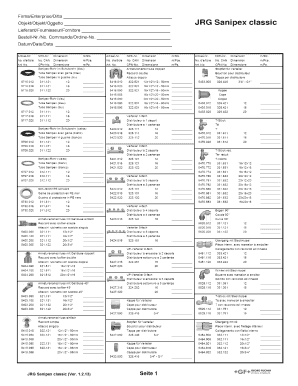
Firma/Enterprise/Ditta Objekt/Objekt/Oggetto Lieferant/Fournisseur/Fornitore BestellNr./No. Commande/OrdineNo. Datum/Date/Data ArtikelNr. NPKNr. Dimension m/Stk. ArtikelNr. NPKNr. Dimension m/Stk.

How it works

  1. Open form

    Open form follow the instructions

  2. Easily sign form

    Easily sign the form with your finger

  3. Share form

    Send filled & signed form or save

How to use or fill out the Ausmassblatt JRG Sanipex Classic-1.2.13 online

Filling out the Ausmassblatt JRG Sanipex Classic-1.2.13 can be a straightforward process when done online. This guide provides detailed instructions to help users complete the form accurately and efficiently.

Follow the steps to successfully complete the form

  1. Click ‘Get Form’ button to obtain the Ausmassblatt JRG Sanipex Classic-1.2.13 and open it in the online editor.
  2. In the first section, enter the name of your enterprise. This is the company or organization for which the order is being placed.
  3. Next, fill in the object or project name in the designated field. This should reflect the specific job or installation related to the order.
  4. Input the supplier’s name in the supplier section. Ensure that you accurately enter the supplier's full name.
  5. Record the order number in the order number field. This is usually provided by the supplier.
  6. Enter the date of the order in the date field. Use the required format for clarity.
  7. Proceed to fill in the article number for each item needed. There are multiple fields for articles, so make sure to fill them sequentially.
  8. For each article entered, include its NPK number, dimension, and quantity in meters per piece. Ensure precision to avoid any errors.
  9. Once you have completed all relevant sections, review the form for any mistakes or omissions.
  10. After verifying the information, you can save your changes. Options to download, print, or share the form will be available.

Complete your documents online with ease and confidence.

Get form

Experience a faster way to fill out and sign forms on the web. Access the most extensive library of templates available.
Get form

Related links form

European Record Application Masters Swimming Everest Refrigeration Authorized Service Center Agreement Everett Yacht Club Membership Application EverGuard Notice Award 2004

Questions & Answers

Get answers to your most pressing questions about US Legal Forms API.

Contact support

Solution to the practical question This means that you should replace the name of the source code file in your command with the variable $MYFILE. This means that the script above will compile any source code stored to the variable $MYFILE and give the output in assembler language with the extension .o .

Compiling - The modified source code is compiled into binary object code. This code is not yet executable. Linking - The object code is combined with required supporting code to make an executable program. This step typically involves adding in any libraries that are required.

To summarize, the steps involved in compiling, linking, and running a program are: Compile the ``.c'' file containing the source code with a command such as. gcc -Wall -g -c hello.c. ... Link the ``.o'' file to produce an executable with a command such as. gcc -o hello hello.o -lm. ... Run the executable in the usual way.

Well wonder no more, I will show you all easy steps to link your own C-Program source files. Step 1: Create Your Two C-Program Source Files. First thing to do is create your two programs. ... Step 2: Save Both Files In The Same Location. ... Step 3: Open Command Prompt And Run These Commands. ... Step 4: You're Done !

Compiling is the transformation from Source Code (human readable) into machine code (computer executable). A compiler is a program.

0:33 1:58 C compile and run a C program with cmd 🏗️ (optional video) - YouTube YouTube Start of suggested clip End of suggested clip And all we have to do is run that so that is the third step a dot e x e enter. I love pizza. It'sMoreAnd all we have to do is run that so that is the third step a dot e x e enter. I love pizza. It's really good. So yeah that's how to compile.

Overall Process Type the program in C editor and save with . ... Press Alt + F9 to compile the program. If there are errors, correct the errors and recompile the program. If there are no errors, then press Ctrl + F9 to execute/run the program. Press Alt + F5 to open User Screen and check the result.

Compiling - The modified source code is compiled into binary object code. This code is not yet executable. Linking - The object code is combined with required supporting code to make an executable program. This step typically involves adding in any libraries that are required.

Get This Form Now!

Use professional pre-built templates to fill in and sign documents online faster. Get access to thousands of forms.
Get form
If you believe that this page should be taken down, please follow our DMCA take down processhere.
Get Ausmassblatt JRG Sanipex Classic-1.2.13
Get form
  • Adoption
  • Bankruptcy
  • Contractors
  • Divorce
  • Home Sales
  • Employment
  • Identity Theft
  • Incorporation
  • Landlord Tenant
  • Living Trust
  • Name Change
  • Personal Planning
  • Small Business
  • Wills & Estates
  • Packages A-Z
  • Affidavits
  • Bankruptcy
  • Bill of Sale
  • Corporate - LLC
  • Divorce
  • Employment
  • Identity Theft
  • Internet Technology
  • Landlord Tenant
  • Living Wills
  • Name Change
  • Power of Attorney
  • Real Estate
  • Small Estates
  • Wills
  • All Forms
  • Forms A-Z
  • Other Templates
  • Legal Hub
  • About Us
  • Help Portal
  • Legal Resources
  • Blog
  • Affiliates
  • Contact Us
  • Delete My Account
  • Site Map
  • Industries
  • Forms in Spanish
  • Localized Forms
  • State-specific Forms
  • Forms Kit
  • Real Estate Handbook
  • All Guides
  • Notarize
  • Incorporation services
  • For Consumers
  • For Small Business
  • For Attorneys
  • USLegal
  • FormsPass
  • pdfFiller
  • signNow
  • altaFlow
  • DocHub
  • Instapage
Form Packages
  • Adoption
  • Bankruptcy
  • Contractors
  • Divorce
  • Home Sales
  • Employment
  • Identity Theft
  • Incorporation
  • Landlord Tenant
  • Living Trust
  • Name Change
  • Personal Planning
  • Small Business
  • Wills & Estates
  • Packages A-Z
Form Categories
  • Affidavits
  • Bankruptcy
  • Bill of Sale
  • Corporate - LLC
  • Divorce
  • Employment
  • Identity Theft
  • Internet Technology
  • Landlord Tenant
  • Living Wills
  • Name Change
  • Power of Attorney
  • Real Estate
  • Small Estates
  • Wills
  • All Forms
  • Forms A-Z
  • Other Templates
Customer Service
  • Legal Hub
  • About Us
  • Help Portal
  • Legal Resources
  • Blog
  • Affiliates
  • Contact Us
  • Delete My Account
  • Site Map
  • Industries
  • Forms in Spanish
  • Localized Forms
  • State-specific Forms
  • Forms Kit
Legal Guides
  • Real Estate Handbook
  • All Guides
Prepared for you
  • Notarize
  • Incorporation services
Our Customers
  • For Consumers
  • For Small Business
  • For Attorneys
Our Sites
  • USLegal
  • FormsPass
  • pdfFiller
  • signNow
  • altaFlow
  • DocHub
  • Instapage
Social Media
Call us now toll free:
+1 833 426 79 33
As seen in:
© Copyright 1999-2026 airSlate Legal Forms, Inc. 17 Station Street, Ste. 203, Brookline, MA 02445
  • Your Privacy Choices
  • Terms of Service
  • Privacy Notice
  • Content Takedown Policy
  • Bug Bounty Program