We use cookies to improve security, personalize the user experience, enhance our marketing activities (including cooperating with our marketing partners) and for other business use.
Click "here" to read our Cookie Policy. By clicking "Accept" you agree to the use of cookies. Read less
Read more
Accept
Loading
Form preview
  • US Legal Forms
  • Form Library
  • More Forms
  • More Multi-State Forms
  • Personal Data Record

Get Personal Data Record

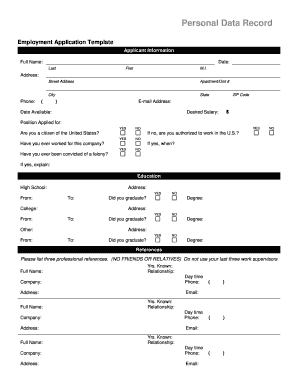
Personal Data Record Employment Application Template Applicant Information Full Name: Date: Last First M.I. Address: Street Address Apartment/Unit # City Phone: ( State ) ZIP Code Email Address: Date.

How it works

  1. Open form

    Open form follow the instructions

  2. Easily sign form

    Easily sign the form with your finger

  3. Share form

    Send filled & signed form or save

How to fill out the Personal Data Record online

Completing the Personal Data Record online is an essential step in the employment application process. This guide provides clear and supportive instructions to help you accurately fill out each section of the form.

Follow the steps to effectively complete your Personal Data Record.

  1. Click ‘Get Form’ button to obtain the form and open it in your browser.
  2. Enter your full name, including last name, first name, and middle initial. This ensures your personal details are correctly recorded.
  3. Fill in your address, including street address, apartment or unit number, city, state, and ZIP code.
  4. Provide your phone number and email address. This information is crucial for communication with the employer.
  5. Indicate the date you are available to start and your desired salary.
  6. Select the position you are applying for and answer the citizenship question. If not a citizen, specify whether you are authorized to work in the U.S.
  7. Answer whether you have previously worked for the company and provide the date if applicable.
  8. Disclose any felony convictions if applicable and provide explanations as necessary.
  9. Proceed to the education section. Fill in the details for your high school, including the address, dates attended, and graduation status.
  10. Continue with college education by providing the degree obtained, address, and attendance dates. Indicate graduation status.
  11. If applicable, fill out any additional educational experiences or qualifications.
  12. In the references section, list three professional references, including their full names, relationship to you, and contact details. Avoid personal friends or relatives.
  13. Provide the information of your previous employment, including company name, supervisor details, job title, starting and ending salary, responsibilities, duration of employment, reason for leaving, and contact permissions.
  14. If you have military service, fill in the branch, rank at discharge, service dates, and type of discharge, including explanations if necessary.
  15. Finally, review the disclaimer statement. Certify that all provided answers are accurate. Sign and date the form.
  16. Once completed, save your changes, download the document, print it, or share it with the appropriate parties.

Complete your Personal Data Record online for a smooth application process.

Get form

Experience a faster way to fill out and sign forms on the web. Access the most extensive library of templates available.
Get form

Related content

Candidate Personal Data Record - RegInfo.gov
Send your completed forin to Admissions, U.S. Military Academy, Official Mail and...
Learn more
GDPR Consent Form Template – Office Of The...
Your personal data will be stored in accordance with the record retention requirements...
Learn more
Data breach - Wikipedia
A data breach is the intentional or unintentional release of secure or...
Learn more

Related links form

VA SWGP-VAR05-RS 2014 VA VA0088676 2015 VT DoL C-50 2005 VT Gas Systems Pressure Test Form

Questions & Answers

Get answers to your most pressing questions about US Legal Forms API.

Contact support

Finding your personal record requires knowing where to look. Start with any governmental or financial institutions you have interacted with, as they often maintain detailed records. Additionally, consider searching online databases or using professional services that specialize in data retrieval. US Legal Forms can offer you the necessary forms and advice to streamline your search for your personal data record.

To access your personal data, you should first gather information about which organizations hold your personal data record. Reach out to these organizations and request access to your data, citing any applicable laws that support your request. Many organizations have procedures in place to facilitate this process. US Legal Forms provides resources that can guide you through the necessary steps to ensure you obtain your information accurately.

Removing your personal information from the internet involves several steps. Start by searching your name and reviewing the sites that display your personal data record. You can contact these sites to request removal, or use privacy services that specialize in this task. Consider using US Legal Forms to access relevant legal documents that can assist in protecting your personal data online.

To request personal records, you need to identify which organization holds your personal data record. You can contact them directly, either through their website or customer service, and ask for the specific records you need. Be prepared to provide identification and any required forms. Using a service like US Legal Forms can simplify this process, offering templates to help you make your request efficiently.

Writing your personal data requires careful attention to detail. Start by listing essential information such as your name, address, and contact numbers, ensuring accuracy and clarity. Consider using a template or document provided by platforms like US Legal, which can guide you through the process of compiling your Personal Data Record. Keeping this data organized will make it easier for you to access it when needed.

A personal record is any document or file that contains information about an individual. An example would be your birth certificate, which includes your name, date of birth, and place of birth. Such records are important components of your Personal Data Record, as they help establish your identity and legal status. Keeping accurate personal records is essential for various legal and administrative processes.

To fill up a PDS form by hand, start by gathering all necessary information, such as your full name, address, and contact details. Write clearly and legibly to ensure that all data is accurate and easy to read. If you need guidance on specific sections, refer to the instructions provided with the form, as they can clarify any confusing parts. For a more streamlined process, consider using the US Legal platform, which offers templates and advice for completing forms.

Yes, you can submit a FOIA (Freedom of Information Act) request regarding your own personal data record. This process allows you to request information from federal agencies about yourself. However, keep in mind that some information may be exempt from disclosure for privacy or security reasons. To simplify this process, consider using US Legal Forms, which offers templates and guidance to help you file your request correctly.

To obtain a copy of your personal data record, you should contact the organization that holds your information. Typically, you can submit a request through their website, or directly by email or phone. Many organizations are required by law to provide this information, so they should respond promptly. If you need assistance, platforms like US Legal Forms can guide you through the process, ensuring you receive your records efficiently.

The four types of personal data include identification data, contact information, financial data, and sensitive data. Identification data encompasses names and social security numbers, while contact information includes addresses and phone numbers. Financial data refers to bank details and credit card information, and sensitive data covers health records and biometric information. Knowing these categories can help you recognize the importance of your personal data record.

Get This Form Now!

Use professional pre-built templates to fill in and sign documents online faster. Get access to thousands of forms.
Get form
If you believe that this page should be taken down, please follow our DMCA take down processhere.

Industry-leading security and compliance

US Legal Forms protects your data by complying with industry-specific security standards.
  • In businnes since 1997
    25+ years providing professional legal documents.
  • Accredited business
    Guarantees that a business meets BBB accreditation standards in the US and Canada.
  • Secured by Braintree
    Validated Level 1 PCI DSS compliant payment gateway that accepts most major credit and debit card brands from across the globe.
Get Personal Data Record
Get form
Form Packages
Adoption
Bankruptcy
Contractors
Divorce
Home Sales
Employment
Identity Theft
Incorporation
Landlord Tenant
Living Trust
Name Change
Personal Planning
Small Business
Wills & Estates
Packages A-Z
Form Categories
Affidavits
Bankruptcy
Bill of Sale
Corporate - LLC
Divorce
Employment
Identity Theft
Internet Technology
Landlord Tenant
Living Wills
Name Change
Power of Attorney
Real Estate
Small Estates
Wills
All Forms
Forms A-Z
Form Library
Customer Service
Terms of Service
Privacy Notice
Legal Hub
Content Takedown Policy
Bug Bounty Program
About Us
Blog
Affiliates
Contact Us
Delete My Account
Site Map
Industries
Forms in Spanish
Localized Forms
State-specific Forms
Forms Kit
Legal Guides
Real Estate Handbook
All Guides
Prepared for You
Notarize
Incorporation services
Our Customers
For Consumers
For Small Business
For Attorneys
Our Sites
US Legal Forms
USLegal
FormsPass
pdfFiller
signNow
airSlate WorkFlow
DocHub
Instapage
Social Media
Call us now toll free:
+1 833 426 79 33
As seen in:
  • USA Today logo picture
  • CBC News logo picture
  • LA Times logo picture
  • The Washington Post logo picture
  • AP logo picture
  • Forbes logo picture
© Copyright 1997-2025
airSlate Legal Forms, Inc.
3720 Flowood Dr, Flowood, Mississippi 39232
Form Packages
Adoption
Bankruptcy
Contractors
Divorce
Home Sales
Employment
Identity Theft
Incorporation
Landlord Tenant
Living Trust
Name Change
Personal Planning
Small Business
Wills & Estates
Packages A-Z
Form Categories
Affidavits
Bankruptcy
Bill of Sale
Corporate - LLC
Divorce
Employment
Identity Theft
Internet Technology
Landlord Tenant
Living Wills
Name Change
Power of Attorney
Real Estate
Small Estates
Wills
All Forms
Forms A-Z
Form Library
Customer Service
Terms of Service
Privacy Notice
Legal Hub
Content Takedown Policy
Bug Bounty Program
About Us
Blog
Affiliates
Contact Us
Delete My Account
Site Map
Industries
Forms in Spanish
Localized Forms
State-specific Forms
Forms Kit
Legal Guides
Real Estate Handbook
All Guides
Prepared for You
Notarize
Incorporation services
Our Customers
For Consumers
For Small Business
For Attorneys
Our Sites
US Legal Forms
USLegal
FormsPass
pdfFiller
signNow
airSlate WorkFlow
DocHub
Instapage
Social Media
Call us now toll free:
+1 833 426 79 33
As seen in:
  • USA Today logo picture
  • CBC News logo picture
  • LA Times logo picture
  • The Washington Post logo picture
  • AP logo picture
  • Forbes logo picture
© Copyright 1997-2025
airSlate Legal Forms, Inc.
3720 Flowood Dr, Flowood, Mississippi 39232