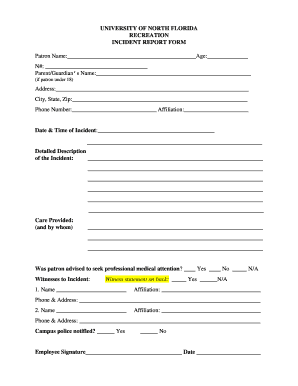
UNIVERSITY OF NORTH FLORIDA RECREATION INCIDENT REPORT FORM Patron Name: Age: N#: Parent/Guardian's Name: (if patron under 18) Address: City, State, Zip: Phone Number: Affiliation: Date & Time.
Open form follow the instructions
Easily sign the form with your finger
Send filled & signed form or save
How to fill out the Incident Report Template For Recreation Form online
Filling out the Incident Report Template For Recreation Form is a crucial process for documenting incidents that occur during recreational activities. This guide aims to provide clear, step-by-step instructions to help users complete the form online efficiently.
Follow the steps to complete the form accurately.
- Click 'Get Form' button to access the form and open it in the online editing interface.
- Enter the patron's full name in the designated field for 'Patron Name.' Below that, input their age in the provided space.
- Fill in the patron's identification number (N#) to ensure accurate records.
- If the patron is under 18, include the parent or guardian's name in the appropriate section.
- Complete the address information, including city, state, and zip code, ensuring that all details are correctly entered.
- Input a contact phone number for the patron as well as their affiliation, which may include details such as student, staff, or visitor.
- Record the date and time of the incident in the specified fields.
- Document any care provided and indicate who administered it.
- Indicate whether the patron was advised to seek professional medical attention by checking the appropriate box.
- List any witnesses to the incident. Include their names, affiliations, and contact details in the corresponding fields.
- Specify if campus police were notified by marking 'Yes' or 'No.'
- Obtain the necessary signatures from the employee and manager in the provided signature lines along with the corresponding dates.
- If there are witnesses, ensure that their statements are recorded accurately, with the Recreation staff encouraging them to report only observable facts.
- Once all sections are completed, users can save changes, download a copy, print the form, or share it as needed.
Complete your Incident Report Template For Recreation Form online today to ensure accurate incident documentation.
Experience a faster way to fill out and sign forms on the web. Access the most extensive library of templates available.
Related content
Administrative Regulations: Accident & Injury Reporting Procedure.
Incident Report Form. Reports should be filled out immediately after an incident occurs...
Broadly speaking, a risk assessment is the combined effort of: identifying and analyzing...
Get answers to your most pressing questions about US Legal Forms API.
How to make an incident report form?
To make an incident report form, start by identifying the information that needs to be collected. Include sections for personal details, incident specifics, and any follow-up actions. You can use a template, such as the Incident Report Template For Recreation Form from UsLegalForms, to ensure you include all critical components while saving time on design.
What are the 5 W's in an incident report?
The 5 W's in an incident report stand for Who, What, When, Where, and Why. These elements provide a comprehensive overview of the incident, ensuring all relevant details are captured. Utilizing the Incident Report Template For Recreation Form can help you systematically answer these questions, leading to clearer reporting and better incident management.
How to create an incident report in Excel?
To create an incident report in Excel, open a new spreadsheet and set up columns for critical information such as date, time, location, description, and actions taken. You can utilize Excel's formatting tools to enhance readability. For convenience, consider using the Incident Report Template For Recreation Form available on UsLegalForms, which can be easily customized in Excel.
What is an incident report template?
An incident report template is a standardized document that helps you record details of an event or accident. It typically includes sections for identifying information, a description of the incident, and any follow-up actions taken. The Incident Report Template For Recreation Form is specifically tailored for recreational settings, making it easier for organizations to document incidents effectively.
How do I create an incident report form?
Creating an incident report form involves gathering essential information such as the nature of the incident, the parties involved, and any consequences. You can design the form in a word processor or spreadsheet program. Using the Incident Report Template For Recreation Form from UsLegalForms can save you time and ensure you cover all necessary details.
How to write an incident report template in Word?
To write an incident report template in Word, start by opening a new document. Include sections for the date, time, location, and details of the incident, along with any witnesses. You can use bullet points for clarity and structure. Consider using the Incident Report Template For Recreation Form available on UsLegalForms to simplify the process.
How should incident reports be filed?
Incident reports should be filed according to your organization's specific protocols. Generally, they should be submitted to a designated supervisor or safety officer, who will then review and act upon the information. Using an incident report template for recreation form can simplify this process, ensuring that all required information is included. Consider using US Legal Forms for easy access to templates that comply with industry standards.
How to write an incident report form?
Writing an incident report form involves a few key steps: start with a clear title, provide a detailed description of the incident, and include relevant dates and times. Use the incident report template for recreation form to ensure all necessary sections are covered, such as involved parties and witness statements. Finally, proofread your report to eliminate errors and ensure clarity. A well-structured report contributes to effective incident management.
How to file an incident report example?
To file an incident report example, first find a suitable incident report template for recreation form that meets your needs. Fill in the template with precise details about the incident, such as what happened, who was involved, and where it took place. After completion, review the report for accuracy before submitting it to the appropriate authority. This approach ensures that your example aligns with best practices.
How to file an incident report template?
To file an incident report template for recreation form, start by gathering all necessary information related to the incident. Use a structured template to document the details clearly and accurately. After completing the report, submit it to the designated person or department within your organization. Utilizing a reliable platform, like US Legal Forms, can streamline this process by providing easy access to customizable templates.
Use professional pre-built templates to fill in and sign documents online faster. Get access to thousands of forms.
If you believe that this page should be taken down, please follow our DMCA take down process here.